Cumulus Linux Deployment Guide for VMware NSX-T
VMware NSX-T provides an agile software-defined infrastructure to build cloud-native application environments. It aims to provide automation, simplicity in operations, networking, and security. NSX-T supports various type of environments like multi-hypervisor, bare metal workloads, hybrid/public clouds and more. It serves as the control-plane, data-plane, and management-plane for VMware virtualized overlay solutions.
A VMware virtualized environment requires all virtual and physical elements such as ESXi hypervisors and NSX Edges to communicate to one another over an underlay IP fabric. NVIDIA Spectrum switches provides best-in-class underlay hardware leveraging the Spectrum ASIC providing speeds of 1 to 400Gbps. With NVIDIA Cumulus Linux OS software, the underlying fabric configuration can be easily provisioned to ensure VMware NSX-T proper operations.
This configuration guide examines a few of the most common use cases of VMware NSX-T deployments and shows the required underlay switches configurations of Cumulus Linux.
This guide describes the following scenarios:
- Multi-Chassis Link Aggregation - MLAG for active-active physical layer 2 connectivity
- Virtual Router Redundancy - VRR and VRRP for active-active and redundant layer 3 gateways
- Border Gateway Protocol - BGP to provide underlay IP fabric connectivity between all physical and logical elements. This is the preferred best practice.
NSX-T configuration is not covered in this guide. For more information regarding VMware NSX-T specific design, installation and configuration check - VMware NSX-T Reference Design, NSX-T Data Center Installation Guide, and NSX-T Data Center Administration Guide.
Pure Virtualized Environment
This use case covers a basic VMware environment 100% virtualization based on a pure IP fabric underlay. All communications are between virtual machines (VMs) located on ESXi hypervisors.
NSX-T uses Generic Networking Virtualization Encapsulation (Geneve) as the overlay protocol to transmit virtualized traffic over layer 2 tunnels on top of the layer 3 underlay fabric. The Geneve protocol is like the well-known VXLAN encapsulation, but it has an extended header with more options. You install each NSX-T prepared host (with ESXi added to the NSX-T manager) with kernel modules to act as a Tunnel Endpoint (TEP) device. TEP devices are responsible for encapsulating and decapsulating traffic between virtual machines inside the virtualized network.
The example configurations use the following topology as their basis:
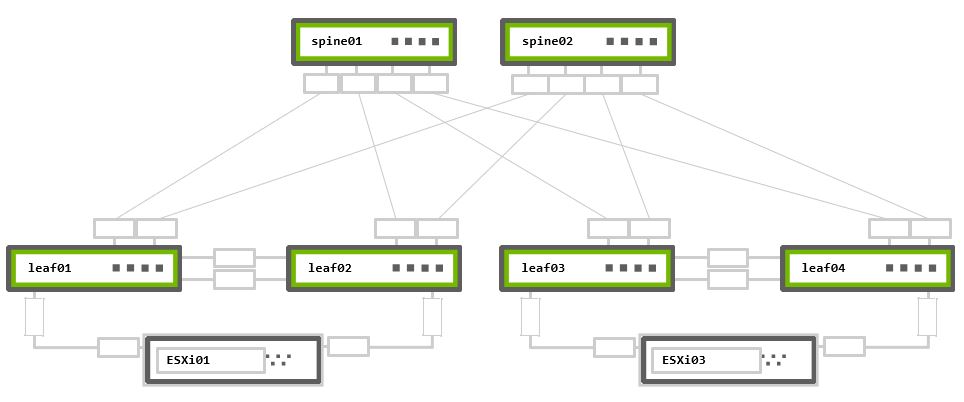
Rack 1 – Two NVIDIA Switches in MLAG + One ESXi hypervisor connected in active-active bonding
Rack 2 – Two NVIDIA Switches in MLAG + One ESXi hypervisor connected in active-active bonding
Physical Connectivity
cumulus@leaf01:mgmt:~$ net show lldp

LocalPort  Speed  Mode     RemoteHost       RemotePort
---------  -----  -------  ---------------  -----------------
eth0       1G     Mgmt     oob-mgmt-switch  swp10
swp1       1G     Default  esxi01           44:38:39:00:00:32
swp49      1G     Default  leaf02           swp49
swp50      1G     Default  leaf02           swp50
swp51      1G     Default  spine01          swp1
swp52      1G     Default  spine02          swp1
cumulus@leaf02:mgmt:~$ net show lldp

LocalPort  Speed  Mode     RemoteHost       RemotePort
---------  -----  -------  ---------------  -----------------
eth0       1G     Mgmt     oob-mgmt-switch  swp11
swp1       1G     Default  esxi01           44:38:39:00:00:38
swp49      1G     Default  leaf01           swp49
swp50      1G     Default  leaf01           swp50
swp51      1G     Default  spine01          swp2
swp52      1G     Default  spine02          swp2
cumulus@leaf03:mgmt:~$ net show lldp

LocalPort  Speed  Mode     RemoteHost       RemotePort
---------  -----  -------  ---------------  -----------------
eth0       1G     Mgmt     oob-mgmt-switch  swp12
swp1       1G     Default  esxi03           44:38:39:00:00:3e
swp49      1G     Default  leaf04           swp49
swp50      1G     Default  leaf04           swp50
swp51      1G     Default  spine01          swp3
swp52      1G     Default  spine02          swp3
cumulus@leaf04:mgmt:~$ net show lldp

LocalPort  Speed  Mode     RemoteHost       RemotePort
---------  -----  -------  ---------------  -----------------
eth0       1G     Mgmt     oob-mgmt-switch  swp13
swp1       1G     Default  esxi03           44:38:39:00:00:44
swp49      1G     Default  leaf03           swp49
swp50      1G     Default  leaf03           swp50
swp51      1G     Default  spine01          swp4
swp52      1G     Default  spine02          swp4
cumulus@spine01:mgmt:~$ net show lldp

LocalPort  Speed  Mode     RemoteHost       RemotePort
---------  -----  -------  ---------------  ----------
eth0       1G     Mgmt     oob-mgmt-switch  swp14
swp1       1G     Default  leaf01           swp51
swp2       1G     Default  leaf02           swp51
swp3       1G     Default  leaf03           swp51
swp4       1G     Default  leaf04           swp51
cumulus@spine02:mgmt:~$ net show lldp

LocalPort  Speed  Mode     RemoteHost       RemotePort
---------  -----  -------  ---------------  ----------
eth0       1G     Mgmt     oob-mgmt-switch  swp15
swp1       1G     Default  leaf01           swp52
swp2       1G     Default  leaf02           swp52
swp3       1G     Default  leaf03           swp52
swp4       1G     Default  leaf04           swp52
MTU Configuration
VMware recommends configuring jumbo MTU (9000) on all virtual and physical network elements end-to-end. On VMkernel ports, virtual switches (VDS), VDS Port-Groups, N-VDS and the underlay physical network. Geneve encapsulation, requires a minimum MTU of 1600B (but 1700B for extended options). VMware recommends using at least a 9000-byte MTU for the entire network path. This improves the throughput of storage, vSAN, vMotion, NFS and vSphere Replication.
Using the below commands, you can examine switches' physical interfaces MTU settings. By default, all interfaces on Cumulus Linux have MTU 9216 configured, and require no additional configuration.
cumulus@leaf01:mgmt:~$ net show interface
State  Name   Spd  MTU    Mode      LLDP                          Summary
-----  -----  ---  -----  --------  ----------------------------  ---------------------------
UP     lo     N/A  65536  Loopback                                IP: 127.0.0.1/8
       lo                                                         IP: ::1/128
UP     eth0   1G   1500   Mgmt      oob-mgmt-switch (swp10)       Master: mgmt(UP)
       eth0                                                       IP: 192.168.200.11/24(DHCP)
UP     swp1   1G   9216   Default   esxi01 (44:38:39:00:00:32)
UP     swp49  1G   9216   Default   leaf02 (swp49)
UP     swp50  1G   9216   Default   leaf02 (swp50)
UP     swp51  1G   9216   Default   spine01 (swp1)
UP     swp52  1G   9216   Default   spine02 (swp1)
UP     mgmt   N/A  65536  VRF                                     IP: 127.0.0.1/8
cumulus@leaf02:mgmt:~$ net show interface
State  Name   Spd  MTU    Mode      LLDP                          Summary
-----  -----  ---  -----  --------  ----------------------------  ---------------------------
UP     lo     N/A  65536  Loopback                                IP: 127.0.0.1/8
       lo                                                         IP: ::1/128
UP     eth0   1G   1500   Mgmt      oob-mgmt-switch (swp11)       Master: mgmt(UP)
       eth0                                                       IP: 192.168.200.12/24(DHCP)
UP     swp1   1G   9216   Default   esxi01 (44:38:39:00:00:38)
UP     swp49  1G   9216   Default   leaf01 (swp49)
UP     swp50  1G   9216   Default   leaf01 (swp50)
UP     swp51  1G   9216   Default   spine01 (swp2)
UP     swp52  1G   9216   Default   spine02 (swp2)
UP     mgmt   N/A  65536  VRF                                     IP: 127.0.0.1/8
cumulus@leaf03:mgmt:~$ net show interface
State  Name   Spd  MTU    Mode      LLDP                          Summary
-----  -----  ---  -----  --------  ----------------------------  ---------------------------
UP     lo     N/A  65536  Loopback                                IP: 127.0.0.1/8
       lo                                                         IP: ::1/128
UP     eth0   1G   1500   Mgmt      oob-mgmt-switch (swp12)       Master: mgmt(UP)
       eth0                                                       IP: 192.168.200.13/24(DHCP)
UP     swp1   1G   9216   Default   esxi03 (44:38:39:00:00:3e)
UP     swp49  1G   9216   Default   leaf04 (swp49)
UP     swp50  1G   9216   Default   leaf04 (swp50)
UP     swp51  1G   9216   Default   spine01 (swp3)
UP     swp52  1G   9216   Default   spine02 (swp3)
UP     mgmt   N/A  65536  VRF                                     IP: 127.0.0.1/8
cumulus@leaf04:mgmt:~$ net show interface
State  Name   Spd  MTU    Mode      LLDP                          Summary
-----  -----  ---  -----  --------  ----------------------------  ---------------------------
UP     lo     N/A  65536  Loopback                                IP: 127.0.0.1/8
       lo                                                         IP: ::1/128
UP     eth0   1G   1500   Mgmt      oob-mgmt-switch (swp13)       Master: mgmt(UP)
       eth0                                                       IP: 192.168.200.14/24(DHCP)
UP     swp1   1G   9216   Default   esxi03 (44:38:39:00:00:44)
UP     swp49  1G   9216   Default   leaf03 (swp49)
UP     swp50  1G   9216   Default   leaf03 (swp50)
UP     swp51  1G   9216   Default   spine01 (swp4)
UP     swp52  1G   9216   Default   spine02 (swp4)
UP     mgmt   N/A  65536  VRF                                     IP: 127.0.0.1/8
cumulus@spine01:mgmt:~$ net show interface
State  Name  Spd  MTU    Mode      LLDP                     Summary
-----  ----  ---  -----  --------  -----------------------  ---------------------------
UP     lo    N/A  65536  Loopback                           IP: 127.0.0.1/8
       lo                                                   IP: ::1/128
UP     eth0  1G   1500   Mgmt      oob-mgmt-switch (swp14)  Master: mgmt(UP)
       eth0                                                 IP: 192.168.200.21/24(DHCP)
UP     swp1  1G   9216   Default   leaf01 (swp51)
UP     swp2  1G   9216   Default   leaf02 (swp51)
UP     swp3  1G   9216   Default   leaf03 (swp51)
UP     swp4  1G   9216   Default   leaf04 (swp51)
UP     mgmt  N/A  65536  VRF                                IP: 127.0.0.1/8
cumulus@spine02:mgmt:~$ net show interface
State  Name  Spd  MTU    Mode      LLDP                     Summary
-----  ----  ---  -----  --------  -----------------------  ---------------------------
UP     lo    N/A  65536  Loopback                           IP: 127.0.0.1/8
       lo                                                   IP: ::1/128
UP     eth0  1G   1500   Mgmt      oob-mgmt-switch (swp15)  Master: mgmt(UP)
       eth0                                                 IP: 192.168.200.22/24(DHCP)
UP     swp1  1G   9216   Default   leaf01 (swp52)
UP     swp2  1G   9216   Default   leaf02 (swp52)
UP     swp3  1G   9216   Default   leaf03 (swp52)
UP     swp4  1G   9216   Default   leaf04 (swp52)
UP     mgmt  N/A  65536  VRF                                IP: 127.0.0.1/8
MLAG and VRR Configuration
In the example topology, VMs are on two different physical ESXi hypervisors. They are in the same IP subnet and connected to the same VMware Logical Switch. Because a layer 3 underlay network divides them, the NSX overlay provides VM-to-VM communication.
The ESXi hypervisors connect to each other using active-active LAG to the leaf switches for redundancy and additional throughput. The Cumulus Linux MLAG and VRR configurations support this ESXi requirement.
You must configure MLAG and VRR when using two switch connections, regardless of which N-VDS uplink profile is in use.
MLAG Configuration
The net add clag peer command configures MLAG.
cumulus@leaf01:mgmt:~$ net add clag peer sys-mac 44:38:39:FF:00:01 interface swp49-50 primary backup-ip 192.168.200.12 vrf mgmt
cumulus@leaf01:mgmt:~$ net commit
cumulus@leaf02:mgmt:~$ net add clag peer sys-mac 44:38:39:FF:00:01 interface swp49-50 secondary backup-ip 192.168.200.11 vrf mgmt
cumulus@leaf02:mgmt:~$ net commit
cumulus@leaf03:mgmt:~$ net add clag peer sys-mac 44:38:39:FF:00:02 interface swp49-50 primary backup-ip 192.168.200.14 vrf mgmt
cumulus@leaf03:mgmt:~$ net commit
cumulus@leaf04:mgmt:~$ net add clag peer sys-mac 44:38:39:FF:00:02 interface swp49-50 secondary backup-ip 192.168.200.13 vrf mgmt
cumulus@leaf04:mgmt:~$ net commit
MLAG Interfaces Configuration - Active-Active LACP LAG N-VDS Uplink Profile
If you use the recommended active-active LAG (LACP) N-VDS uplink profile, you must bond the switch downlink interfaces for ESXi into MLAG ports (LACP bonds).
This action also automatically adds the MLAG interfaces into the bridge and sets them as trunk ports (VLAN tagging) with all VLANs allowed.
For active-standby environments, do not configure MLAG. Follow the instructions under the Switch Ports Configuration - Non-LAG N-VDS Uplink Profile section.
Do not use the active-active LACP LAG uplink profile for the Overlay Transport Zone on N-VDS.
cumulus@leaf01:mgmt:~$ net add clag port bond esxi01 interface swp1 clag-id 1
cumulus@leaf01:mgmt:~$ net commit
cumulus@leaf02:mgmt:~$ net add clag port bond esxi01 interface swp1 clag-id 1
cumulus@leaf02:mgmt:~$ net commit
cumulus@leaf03:mgmt:~$ net add clag port bond esxi03 interface swp1 clag-id 1
cumulus@leaf03:mgmt:~$ net commit
cumulus@leaf04:mgmt:~$ net add clag port bond esxi03 interface swp1 clag-id 1
cumulus@leaf04:mgmt:~$ net commit
For information on how to assign VLANs to trunk ports, see VLAN-aware Bridge Mode and Traditional Bridge Mode.
Switch Ports Configuration - Non-LAG N-VDS Uplink Profile
If you use active-standby or active-active, non-LAG N-VDS uplink profiles, you must keep the switch downlink interfaces for ESXi configured as regular ports; do not use any MLAG port configurations. You must add them to the bridge as trunk ports.
cumulus@leaf01:mgmt:~$ net add interface swp1 bridge trunk
cumulus@leaf01:mgmt:~$ net commit
cumulus@leaf02:mgmt:~$ net add interface swp1 bridge trunk
cumulus@leaf02:mgmt:~$ net commit
cumulus@leaf03:mgmt:~$ net add interface swp1 bridge trunk
cumulus@leaf03:mgmt:~$ net commit
cumulus@leaf04:mgmt:~$ net add interface swp1 bridge trunk
cumulus@leaf04:mgmt:~$ net commit
MLAG Configuration Verification
You can use the net show clag command to verify configurations. In this example esxi01 and esxi03 are the MLAG interfaces connected to ESXi hosts.
cumulus@leaf01:mgmt:~$ net show clag
The peer is alive
     Our Priority, ID, and Role: 1000 44:38:39:00:00:59 primary
    Peer Priority, ID, and Role: 2000 44:38:39:00:00:5a secondary
          Peer Interface and IP: peerlink.4094 fe80::4638:39ff:fe00:5a (linklocal)
                      Backup IP: 192.168.200.12 vrf mgmt (active)
                     System MAC: 44:38:39:ff:00:01

CLAG Interfaces
Our Interface      Peer Interface     CLAG Id   Conflicts              Proto-Down Reason
----------------   ----------------   -------   --------------------   -----------------
          esxi01   esxi01             1         -                      -
cumulus@leaf02:mgmt:~$ net show clag
The peer is alive
     Our Priority, ID, and Role: 2000 44:38:39:00:00:5a secondary
    Peer Priority, ID, and Role: 1000 44:38:39:00:00:59 primary
          Peer Interface and IP: peerlink.4094 fe80::4638:39ff:fe00:59 (linklocal)
                      Backup IP: 192.168.200.11 vrf mgmt (active)
                     System MAC: 44:38:39:ff:00:01

CLAG Interfaces
Our Interface      Peer Interface     CLAG Id   Conflicts              Proto-Down Reason
----------------   ----------------   -------   --------------------   -----------------
          esxi01   esxi01             1         -                      -
cumulus@leaf03:mgmt:~$ net show clag
The peer is alive
     Our Priority, ID, and Role: 1000 44:38:39:00:00:5d primary
    Peer Priority, ID, and Role: 2000 44:38:39:00:00:5e secondary
          Peer Interface and IP: peerlink.4094 fe80::4638:39ff:fe00:5e (linklocal)
                      Backup IP: 192.168.200.14 vrf mgmt (active)
                     System MAC: 44:38:39:ff:00:02

CLAG Interfaces
Our Interface      Peer Interface     CLAG Id   Conflicts              Proto-Down Reason
----------------   ----------------   -------   --------------------   -----------------
          esxi03   esxi03             1         -                      -
cumulus@leaf04:mgmt:~$ net show clag
The peer is alive
     Our Priority, ID, and Role: 2000 44:38:39:00:00:5e secondary
    Peer Priority, ID, and Role: 1000 44:38:39:00:00:5d primary
          Peer Interface and IP: peerlink.4094 fe80::4638:39ff:fe00:5d (linklocal)
                      Backup IP: 192.168.200.13 vrf mgmt (active)
                     System MAC: 44:38:39:ff:00:02

CLAG Interfaces
Our Interface      Peer Interface     CLAG Id   Conflicts              Proto-Down Reason
----------------   ----------------   -------   --------------------   -----------------
          esxi03   esxi03             1         -                      -
Non-LAG N-VDS uplink profiles do not show the MLAG ports in MLAG show output. The lack of MLAG ports does not mean that MLAG is not functional. MLAG is mandatory for using VRR — also known as enhanced VRRP, which you need for the non-LAG uplink profiles.
VRR Configuration
You can have the ESXi TEP IP addresses on the same or different subnets. The VMware best practice configuration for the TEP IP pool is to assign different subnets for each physical rack.
You configure VRR to provide redundant default gateways to the ESXi servers.
VMware requires a VLAN per each type of traffic, for example, storage, vSAN, vMotion, or Overlay (TEP) traffic. This use case focuses only on the overlay VM to VM traffic and switches configurations.
The VLAN ID is a local parameter and not shared between the hypervisors. For deployment simplicity, use the same VLAN ID for all TEP devices used in both racks.
cumulus@leaf01:mgmt:~$ net add vlan 100
cumulus@leaf01:mgmt:~$ net add vlan 100 ip address 10.1.1.252/24
cumulus@leaf01:mgmt:~$ net add vlan 100 ip address-virtual 00:00:00:00:01:00 10.1.1.254/24
cumulus@leaf01:mgmt:~$ net commit
cumulus@leaf02:mgmt:~$ net add vlan 100
cumulus@leaf02:mgmt:~$ net add vlan 100 ip address 10.1.1.253/24
cumulus@leaf02:mgmt:~$ net add vlan 100 ip address-virtual 00:00:00:00:01:00 10.1.1.254/24
cumulus@leaf02:mgmt:~$ net commit
cumulus@leaf03:mgmt:~$ net add vlan 100
cumulus@leaf03:mgmt:~$ net add vlan 100 ip address 10.2.2.252/24
cumulus@leaf03:mgmt:~$ net add vlan 100 ip address-virtual 00:00:00:01:00:00 10.2.2.254/24
cumulus@leaf03:mgmt:~$ net commit
cumulus@leaf04:mgmt:~$ net add vlan 100
cumulus@leaf04:mgmt:~$ net add vlan 100 ip address 10.2.2.253/24
cumulus@leaf04:mgmt:~$ net add vlan 100 ip address-virtual 00:00:00:01:00:00 10.2.2.254/24
cumulus@leaf04:mgmt:~$ net commit
VRR Configuration Verification
The net show interface output displays the SVI and VRR interfaces as vlanXXX and vlanXXX-v0.
cumulus@leaf01:mgmt:~$ net show interface
State  Name           Spd  MTU    Mode          LLDP                          Summary
-----  -------------  ---  -----  ------------  ----------------------------  ---------------------------
UP     lo             N/A  65536  Loopback                                    IP: 127.0.0.1/8
       lo                                                                     IP: ::1/128
UP     eth0           1G   1500   Mgmt          oob-mgmt-switch (swp10)       Master: mgmt(UP)
       eth0                                                                   IP: 192.168.200.11/24(DHCP)
UP     swp1           1G   9216   BondMember    esxi01 (44:38:39:00:00:32)    Master: esxi01(UP)
UP     swp49          1G   9216   BondMember    leaf02 (swp49)                Master: peerlink(UP)
UP     swp50          1G   9216   BondMember    leaf02 (swp50)                Master: peerlink(UP)
UP     swp51          1G   9216   Default       spine01 (swp1)
UP     swp52          1G   9216   Default       spine02 (swp1)
UP     bridge         N/A  9216   Bridge/L2
UP     esxi01         1G   9216   802.3ad                                     Master: bridge(UP)
       esxi01                                                                 Bond Members: swp1(UP)
UP     mgmt           N/A  65536  VRF                                         IP: 127.0.0.1/8
UP     peerlink       2G   9216   802.3ad                                     Master: bridge(UP)
       peerlink                                                               Bond Members: swp49(UP)
       peerlink                                                               Bond Members: swp50(UP)
UP     peerlink.4094  2G   9216   Default
UP     vlan100        N/A  9216   Interface/L3                                IP: 10.1.1.252/24
UP     vlan100-v0     N/A  9216   Interface/L3                                IP: 10.1.1.254/24
cumulus@leaf02:mgmt:~$ net show interface
State  Name           Spd  MTU    Mode          LLDP                          Summary
-----  -------------  ---  -----  ------------  ----------------------------  ---------------------------
UP     lo             N/A  65536  Loopback                                    IP: 127.0.0.1/8
       lo                                                                     IP: ::1/128
UP     eth0           1G   1500   Mgmt          oob-mgmt-switch (swp11)       Master: mgmt(UP)
       eth0                                                                   IP: 192.168.200.12/24(DHCP)
UP     swp1           1G   9216   BondMember    esxi01 (44:38:39:00:00:38)    Master: esxi01(UP)
UP     swp49          1G   9216   BondMember    leaf01 (swp49)                Master: peerlink(UP)
UP     swp50          1G   9216   BondMember    leaf01 (swp50)                Master: peerlink(UP)
UP     swp51          1G   9216   Default       spine01 (swp2)
UP     swp52          1G   9216   Default       spine02 (swp2)
UP     bridge         N/A  9216   Bridge/L2
UP     esxi01         1G   9216   802.3ad                                     Master: bridge(UP)
       esxi01                                                                 Bond Members: swp1(UP)
UP     mgmt           N/A  65536  VRF                                         IP: 127.0.0.1/8
UP     peerlink       2G   9216   802.3ad                                     Master: bridge(UP)
       peerlink                                                               Bond Members: swp49(UP)
       peerlink                                                               Bond Members: swp50(UP)
UP     peerlink.4094  2G   9216   Default
UP     vlan100        N/A  9216   Interface/L3                                IP: 10.1.1.253/24
UP     vlan100-v0     N/A  9216   Interface/L3                                IP: 10.1.1.254/24
cumulus@leaf03:mgmt:~$ net show interface
State  Name           Spd  MTU    Mode          LLDP                          Summary
-----  -------------  ---  -----  ------------  ----------------------------  ---------------------------
UP     lo             N/A  65536  Loopback                                    IP: 127.0.0.1/8
       lo                                                                     IP: ::1/128
UP     eth0           1G   1500   Mgmt          oob-mgmt-switch (swp12)       Master: mgmt(UP)
       eth0                                                                   IP: 192.168.200.13/24(DHCP)
UP     swp1           1G   9216   BondMember    esxi03 (44:38:39:00:00:3e)    Master: esxi03(UP)
UP     swp49          1G   9216   BondMember    leaf04 (swp49)                Master: peerlink(UP)
UP     swp50          1G   9216   BondMember    leaf04 (swp50)                Master: peerlink(UP)
UP     swp51          1G   9216   Default       spine01 (swp3)
UP     swp52          1G   9216   Default       spine02 (swp3)
UP     bridge         N/A  9216   Bridge/L2
UP     esxi03         1G   9216   802.3ad                                     Master: bridge(UP)
       esxi03                                                                 Bond Members: swp1(UP)
UP     mgmt           N/A  65536  VRF                                         IP: 127.0.0.1/8
UP     peerlink       2G   9216   802.3ad                                     Master: bridge(UP)
       peerlink                                                               Bond Members: swp49(UP)
       peerlink                                                               Bond Members: swp50(UP)
UP     peerlink.4094  2G   9216   Default
UP     vlan100        N/A  9216   Interface/L3                                IP: 10.2.2.252/24
UP     vlan100-v0     N/A  9216   Interface/L3                                IP: 10.2.2.254/24
cumulus@leaf04:mgmt:~$ net show interface
State  Name           Spd  MTU    Mode          LLDP                          Summary
-----  -------------  ---  -----  ------------  ----------------------------  ---------------------------
UP     lo             N/A  65536  Loopback                                    IP: 127.0.0.1/8
       lo                                                                     IP: ::1/128
UP     eth0           1G   1500   Mgmt          oob-mgmt-switch (swp13)       Master: mgmt(UP)
       eth0                                                                   IP: 192.168.200.14/24(DHCP)
UP     swp1           1G   9216   BondMember    esxi03 (44:38:39:00:00:44)    Master: esxi03(UP)
UP     swp49          1G   9216   BondMember    leaf03 (swp49)                Master: peerlink(UP)
UP     swp50          1G   9216   BondMember    leaf03 (swp50)                Master: peerlink(UP)
UP     swp51          1G   9216   Default       spine01 (swp4)
UP     swp52          1G   9216   Default       spine02 (swp4)
UP     bridge         N/A  9216   Bridge/L2
UP     esxi03         1G   9216   802.3ad                                     Master: bridge(UP)
       esxi03                                                                 Bond Members: swp1(UP)
UP     mgmt           N/A  65536  VRF                                         IP: 127.0.0.1/8
UP     peerlink       2G   9216   802.3ad                                     Master: bridge(UP)
       peerlink                                                               Bond Members: swp49(UP)
       peerlink                                                               Bond Members: swp50(UP)
UP     peerlink.4094  2G   9216   Default
UP     vlan100        N/A  9216   Interface/L3                                IP: 10.2.2.253/24
UP     vlan100-v0     N/A  9216   Interface/L3                                IP: 10.2.2.254/24
BGP Configuration
All underlay IP fabric BGP peerings in this guide use eBGP as the basis for the configuration. The example configurations use Cumulus Linux Auto BGP and BGP Unnumbered configurations.
Auto BGP configuration is only available using NCLU. If you want to use `vtysh` configuration, you must configure a BGP ASN. For additional details, refer to the [Configuring FRRouting](https://rn-stage.d2bfbnaubc8qgr.amplifyapp.com/networking-ethernet-software/cumulus-linux-43/Layer-3/FRRouting/) documentation.
BGP Peerings Establishment
cumulus@leaf01:mgmt:~$ net add bgp autonomous-system leaf
cumulus@leaf01:mgmt:~$ net add bgp neighbor peerlink.4094 remote-as external
cumulus@leaf01:mgmt:~$ net add bgp neighbor swp51 remote-as external
cumulus@leaf01:mgmt:~$ net add bgp neighbor swp52 remote-as external
cumulus@leaf01:mgmt:~$ net add bgp router-id 10.10.10.1
cumulus@leaf01:mgmt:~$ net commit
cumulus@leaf02:mgmt:~$ net add bgp autonomous-system leaf
cumulus@leaf02:mgmt:~$ net add bgp neighbor peerlink.4094 remote-as external
cumulus@leaf02:mgmt:~$ net add bgp neighbor swp51 remote-as external
cumulus@leaf02:mgmt:~$ net add bgp neighbor swp52 remote-as external
cumulus@leaf02:mgmt:~$ net add bgp router-id 10.10.10.2
cumulus@leaf02:mgmt:~$ net commit
cumulus@leaf03:mgmt:~$ net add bgp autonomous-system leaf
cumulus@leaf03:mgmt:~$ net add bgp neighbor peerlink.4094 remote-as external
cumulus@leaf03:mgmt:~$ net add bgp neighbor swp51 remote-as external
cumulus@leaf03:mgmt:~$ net add bgp neighbor swp52 remote-as external
cumulus@leaf03:mgmt:~$ net add bgp router-id 10.10.10.3
cumulus@leaf03:mgmt:~$ net commit
cumulus@leaf04:mgmt:~$ net add bgp autonomous-system leaf
cumulus@leaf04:mgmt:~$ net add bgp neighbor peerlink.4094 remote-as external
cumulus@leaf04:mgmt:~$ net add bgp neighbor swp51 remote-as external
cumulus@leaf04:mgmt:~$ net add bgp neighbor swp52 remote-as external
cumulus@leaf04:mgmt:~$ net add bgp router-id 10.10.10.4
cumulus@leaf04:mgmt:~$ net commit
cumulus@spine01:mgmt:~$ net add bgp autonomous-system spine
cumulus@spine01:mgmt:~$ net add bgp neighbor swp1 remote-as external
cumulus@spine01:mgmt:~$ net add bgp neighbor swp2 remote-as external
cumulus@spine01:mgmt:~$ net add bgp neighbor swp3 remote-as external
cumulus@spine01:mgmt:~$ net add bgp neighbor swp4 remote-as external
cumulus@spine01:mgmt:~$ net add bgp bestpath as-path multipath-relax
cumulus@spine01:mgmt:~$ net add bgp router-id 10.10.10.101
cumulus@spine01:mgmt:~$ net commit
cumulus@spine02:mgmt:~$ net add bgp autonomous-system spine
cumulus@spine02:mgmt:~$ net add bgp neighbor swp1 remote-as external
cumulus@spine02:mgmt:~$ net add bgp neighbor swp2 remote-as external
cumulus@spine02:mgmt:~$ net add bgp neighbor swp3 remote-as external
cumulus@spine02:mgmt:~$ net add bgp neighbor swp4 remote-as external
cumulus@spine02:mgmt:~$ net add bgp bestpath as-path multipath-relax
cumulus@spine02:mgmt:~$ net add bgp router-id 10.10.10.102
cumulus@spine02:mgmt:~$ net commit
cumulus@leaf01:~$ sudo vtysh
leaf01# configure terminal
leaf01(config)# router bgp 65101
leaf01(config-router)# bgp router-id 10.10.10.1
leaf01(config-router)# neighbor peerlink.4094 interface remote-as external
leaf01(config-router)# neighbor swp51 remote-as external
leaf01(config-router)# neighbor swp52 remote-as external
leaf01(config-router)# end
leaf01# write memory
leaf01# exit
cumulus@leaf03:~$ sudo vtysh
leaf02# configure terminal
leaf02(config)# router bgp 65102
leaf02(config-router)# bgp router-id 10.10.10.2
leaf02(config-router)# neighbor peerlink.4094 interface remote-as external
leaf02(config-router)# neighbor swp51 remote-as external
leaf02(config-router)# neighbor swp52 remote-as external
leaf02(config-router)# end
leaf02# write memory
leaf02# exit
cumulus@leaf03:~$ sudo vtysh
leaf03# configure terminal
leaf03(config)# router bgp 65103
leaf03(config-router)# bgp router-id 10.10.10.3
leaf03(config-router)# neighbor peerlink.4094 interface remote-as external
leaf03(config-router)# neighbor swp51 remote-as external
leaf03(config-router)# neighbor swp52 remote-as external
leaf03(config-router)# end
leaf03# write memory
leaf03# exit
cumulus@leaf04:~$ sudo vtysh
leaf04# configure terminal
leaf04(config)# router bgp 65104
leaf04(config-router)# bgp router-id 10.10.10.4
leaf04(config-router)# neighbor peerlink.4094 interface remote-as external
leaf04(config-router)# neighbor swp51 remote-as external
leaf04(config-router)# neighbor swp52 remote-as external
leaf04(config-router)# end
leaf04# write memory
leaf04# exit
cumulus@spine01:~$ sudo vtysh
spine01# configure terminal
spine01(config)# router bgp 65199
spine01(config-router)# bgp router-id 10.10.10.101
spine01(config-router)# neighbor swp1 remote-as external
spine01(config-router)# neighbor swp2 remote-as external
spine01(config-router)# neighbor swp3 remote-as external
spine01(config-router)# neighbor swp4 remote-as external
spine01(config-router)# bgp bestpath as-path multipath-relax
spine01(config-router)# end
spine01# write memory
spine01# exit
cumulus@spine02:~$ sudo vtysh
spine02# configure terminal
spine02(config)# router bgp 65199
spine02(config-router)# bgp router-id 10.10.10.102
spine02(config-router)# neighbor swp1 remote-as external
spine02(config-router)# neighbor swp2 remote-as external
spine02(config-router)# neighbor swp3 remote-as external
spine02(config-router)# neighbor swp4 remote-as external
spine02(config-router)# bgp bestpath as-path multipath-relax
spine02(config-router)# end
spine02# write memory
spine02# exit
TEP VLAN Subnets Advertisement into BGP
ESXi hypervisors build layer 2 overlay tunnels to send Geneve encapsulated traffic over the layer 3 underlay. The underlying IP fabric must be aware of each TEP device in the network. Advertising the local Overlay TEP VLAN (TEP subnet) you created earlier into BGP makes this happen.
Use the redistribute connected command to inject directly connected routes into BGP. You can also use this command with filtering to prevent the advertising of unwanted routes into BGP. For more information, see the Route Filtering and Redistribution documentation.
cumulus@leaf01:mgmt:~$ net add bgp redistribute connected
cumulus@leaf01:mgmt:~$ net commit
cumulus@leaf02:mgmt:~$ net add bgp redistribute connected
cumulus@leaf02:mgmt:~$ net commit
cumulus@leaf03:mgmt:~$ net add bgp redistribute connected
cumulus@leaf03:mgmt:~$ net commit
cumulus@leaf04:mgmt:~$ net add bgp redistribute connected
cumulus@leaf04:mgmt:~$ net commit
cumulus@leaf01:~$ sudo vtysh
leaf01# configure terminal
leaf01(config)# router bgp
leaf01(config-router)# address-family ipv4 unicast
leaf01(config-router-af)# redistribute connected
leaf01(config-router)# end
leaf01# write memory
leaf01# exit
cumulus@leaf02:~$ sudo vtysh
leaf02# configure terminal
leaf02(config)# router bgp
leaf02(config-router)# address-family ipv4 unicast
leaf02(config-router-af)# redistribute connected
leaf02(config-router)# end
leaf02# write memory
leaf02# exit
cumulus@leaf03:~$ sudo vtysh
leaf03# configure terminal
leaf03(config)# router bgp
leaf03(config-router)# address-family ipv4 unicast
leaf03(config-router-af)# redistribute connected
leaf03(config-router)# end
leaf03# write memory
leaf03# exit
cumulus@leaf04:~$ sudo vtysh
leaf04# configure terminal
leaf04(config)# router bgp
leaf04(config-router)# address-family ipv4 unicast
leaf04(config-router-af)# redistribute connected
leaf04(config-router)# end
leaf04# write memory
leaf04# exit
BGP Peerings and Route Advertisement Verification
To verify BGP peerings, use the net show bgp summary command in NCLU, or show ip bgp summary in vtysh
cumulus@leaf01:mgmt:~$ net show bgp summary
show bgp ipv4 unicast summary
=============================
BGP router identifier 10.10.10.1, local AS number 4259632651 vrf-id 0
BGP table version 2
RIB entries 3, using 576 bytes of memory
Peers 3, using 64 KiB of memory

Neighbor              V         AS   MsgRcvd   MsgSent   TblVer  InQ OutQ  Up/Down State/PfxRcd   PfxSnt
leaf02(peerlink.4094) 4 4259632649       367       366        0    0    0 00:18:05            2        2
spine01(swp51)        4 4200000000       366       364        0    0    0 00:17:59            1        2
spine02(swp52)        4 4200000000       368       366        0    0    0 00:18:04            1        2

Total number of neighbors 3
cumulus@leaf02:mgmt:~$ net show bgp summary
show bgp ipv4 unicast summary
=============================
BGP router identifier 10.10.10.2, local AS number 4259632649 vrf-id 0
BGP table version 3
RIB entries 3, using 576 bytes of memory
Peers 3, using 64 KiB of memory

Neighbor              V         AS   MsgRcvd   MsgSent   TblVer  InQ OutQ  Up/Down State/PfxRcd   PfxSnt
leaf01(peerlink.4094) 4 4259632651       410       412        0    0    0 00:20:16            2        2
spine01(swp51)        4 4200000000       413       412        0    0    0 00:20:19            2        2
spine02(swp52)        4 4200000000       411       410        0    0    0 00:20:13            2        2

Total number of neighbors 3
cumulus@leaf03:mgmt:~$ net show bgp summary
show bgp ipv4 unicast summary
=============================
BGP router identifier 10.10.10.3, local AS number 4259632661 vrf-id 0
BGP table version 2
RIB entries 3, using 576 bytes of memory
Peers 3, using 64 KiB of memory

Neighbor              V         AS   MsgRcvd   MsgSent   TblVer  InQ OutQ  Up/Down State/PfxRcd   PfxSnt
leaf04(peerlink.4094) 4 4259632667       418       417        0    0    0 00:20:38            2        2
spine01(swp51)        4 4200000000       419       417        0    0    0 00:20:37            1        2
spine02(swp52)        4 4200000000       417       415        0    0    0 00:20:32            1        2

Total number of neighbors 3
cumulus@leaf04:mgmt:~$ net show bgp summary
show bgp ipv4 unicast summary
=============================
BGP router identifier 10.10.10.4, local AS number 4259632667 vrf-id 0
BGP table version 3
RIB entries 3, using 576 bytes of memory
Peers 3, using 64 KiB of memory

Neighbor              V         AS   MsgRcvd   MsgSent   TblVer  InQ OutQ  Up/Down State/PfxRcd   PfxSnt
leaf03(peerlink.4094) 4 4259632661       448       449        0    0    0 00:22:10            2        2
spine01(swp51)        4 4200000000       449       448        0    0    0 00:22:09            2        2
spine02(swp52)        4 4200000000       447       446        0    0    0 00:22:03            2        2

Total number of neighbors 3
cumulus@spine01:mgmt:~$ net show bgp summary
show bgp ipv4 unicast summary
=============================
BGP router identifier 10.10.10.101, local AS number 4200000000 vrf-id 0
BGP table version 27
RIB entries 3, using 576 bytes of memory
Peers 4, using 85 KiB of memory

Neighbor        V         AS   MsgRcvd   MsgSent   TblVer  InQ OutQ  Up/Down State/PfxRcd   PfxSnt
leaf01(swp1)    4 4259632651     46052     46073        0    0    0 00:22:34            1        2
leaf02(swp2)    4 4259632649     46061     46091        0    0    0 00:22:43            1        2
leaf03(swp3)    4 4259632661     46125     46147        0    0    0 00:22:33            1        2
leaf04(swp4)    4 4259632667     46133     46168        0    0    0 00:22:33            1        2

Total number of neighbors 4
cumulus@spine02:mgmt:~$ net show bgp summary
show bgp ipv4 unicast summary
=============================
BGP router identifier 10.10.10.102, local AS number 4200000000 vrf-id 0
BGP table version 21
RIB entries 3, using 576 bytes of memory
Peers 4, using 85 KiB of memory

Neighbor        V         AS   MsgRcvd   MsgSent   TblVer  InQ OutQ  Up/Down State/PfxRcd   PfxSnt
leaf01(swp1)    4 4259632651     46047     46061        0    0    0 00:23:04            1        2
leaf02(swp2)    4 4259632649     46049     46073        0    0    0 00:23:03            1        2
leaf03(swp3)    4 4259632661     46112     46158        0    0    0 00:22:53            1        2
leaf04(swp4)    4 4259632667     46111     46149        0    0    0 00:22:53            1        2

Total number of neighbors 4
After establishing all BGP peerings, every redistributed local TEP subnet appears in the routing table of each switch. Use the net show route command in NCLU, or show ip route in vtysh to check the routing table.
Leaf01 has two ECMP routes (via both spine switches) to ESXi03 TEP subnet received by BGP - 10.2.2.0/24
cumulus@leaf01:mgmt:~$ net show route
show ip route
=============
Codes: K - kernel route, C - connected, S - static, R - RIP,
       O - OSPF, I - IS-IS, B - BGP, E - EIGRP, N - NHRP,
       T - Table, v - VNC, V - VNC-Direct, A - Babel, D - SHARP,
       F - PBR, f - OpenFabric,
       > - selected route, * - FIB route, q - queued, r - rejected, b - backup
       t - trapped, o - offload failure
C * 10.1.1.0/24 [0/1024] is directly connected, vlan100-v0, 00:28:07
C>* 10.1.1.0/24 is directly connected, vlan100, 00:28:07
B>* 10.2.2.0/24 [20/0] via fe80::4638:39ff:fe00:1, swp51, weight 1, 00:10:13
  *                    via fe80::4638:39ff:fe00:3, swp52, weight 1, 00:10:13
Leaf02 has two ECMP routes (via both spine switches) to ESXi03 TEP subnet received by BGP - 10.2.2.0/24
cumulus@leaf02:mgmt:~$ net show route
show ip route
=============
Codes: K - kernel route, C - connected, S - static, R - RIP,
       O - OSPF, I - IS-IS, B - BGP, E - EIGRP, N - NHRP,
       T - Table, v - VNC, V - VNC-Direct, A - Babel, D - SHARP,
       F - PBR, f - OpenFabric,
       > - selected route, * - FIB route, q - queued, r - rejected, b - backup
       t - trapped, o - offload failure
C * 10.1.1.0/24 [0/1024] is directly connected, vlan100-v0, 00:28:17
C>* 10.1.1.0/24 is directly connected, vlan100, 00:28:17
B>* 10.2.2.0/24 [20/0] via fe80::4638:39ff:fe00:9, swp51, weight 1, 00:10:19
  *                    via fe80::4638:39ff:fe00:b, swp52, weight 1, 00:10:19
Leaf03 has two ECMP routes (via both spine switches) to ESXi01 TEP subnet received by BGP - 10.1.1.0/24
cumulus@leaf03:mgmt:~$ net show route
show ip route
=============
Codes: K - kernel route, C - connected, S - static, R - RIP,
       O - OSPF, I - IS-IS, B - BGP, E - EIGRP, N - NHRP,
       T - Table, v - VNC, V - VNC-Direct, A - Babel, D - SHARP,
       F - PBR, f - OpenFabric,
       > - selected route, * - FIB route, q - queued, r - rejected, b - backup
       t - trapped, o - offload failure
B>* 10.1.1.0/24 [20/0] via fe80::4638:39ff:fe00:11, swp51, weight 1, 00:10:27
  *                    via fe80::4638:39ff:fe00:13, swp52, weight 1, 00:10:27
C * 10.2.2.0/24 [0/1024] is directly connected, vlan100-v0, 00:28:11
C>* 10.2.2.0/24 is directly connected, vlan100, 00:28:11
Leaf04 has two ECMP routes (via both spine switches) to ESXi01 TEP subnet received by BGP - 10.1.1.0/24
cumulus@leaf04:mgmt:~$ net show route
show ip route
=============
Codes: K - kernel route, C - connected, S - static, R - RIP,
       O - OSPF, I - IS-IS, B - BGP, E - EIGRP, N - NHRP,
       T - Table, v - VNC, V - VNC-Direct, A - Babel, D - SHARP,
       F - PBR, f - OpenFabric,
       > - selected route, * - FIB route, q - queued, r - rejected, b - backup
       t - trapped, o - offload failure
B>* 10.1.1.0/24 [20/0] via fe80::4638:39ff:fe00:19, swp51, weight 1, 00:10:30
  *                    via fe80::4638:39ff:fe00:1b, swp52, weight 1, 00:10:30
C * 10.2.2.0/24 [0/1024] is directly connected, vlan100-v0, 00:28:11
C>* 10.2.2.0/24 is directly connected, vlan100, 00:28:11
Spine01 has two ECMP routes to each of the ESXi hypervisors' TEP subnet received by BGP - 10.1.1.0/24 and 10.2.2.0/24
cumulus@spine01:mgmt:~$ net show route
show ip route
=============
Codes: K - kernel route, C - connected, S - static, R - RIP,
       O - OSPF, I - IS-IS, B - BGP, E - EIGRP, N - NHRP,
       T - Table, v - VNC, V - VNC-Direct, A - Babel, D - SHARP,
       F - PBR, f - OpenFabric,
       > - selected route, * - FIB route, q - queued, r - rejected, b - backup
       t - trapped, o - offload failure
B>* 10.1.1.0/24 [20/0] via fe80::4638:39ff:fe00:2, swp1, weight 1, 00:07:44
  *                    via fe80::4638:39ff:fe00:a, swp2, weight 1, 00:07:44
B>* 10.2.2.0/24 [20/0] via fe80::4638:39ff:fe00:12, swp3, weight 1, 00:07:39
  *                    via fe80::4638:39ff:fe00:1a, swp4, weight 1, 00:07:39
Spine02 has two ECMP routes to each of the ESXi hypervisors' TEP subnet received by BGP - 10.1.1.0/24 and 10.2.2.0/24
cumulus@spine02:mgmt:~$ net show route
show ip route
=============
Codes: K - kernel route, C - connected, S - static, R - RIP,
       O - OSPF, I - IS-IS, B - BGP, E - EIGRP, N - NHRP,
       T - Table, v - VNC, V - VNC-Direct, A - Babel, D - SHARP,
       F - PBR, f - OpenFabric,
       > - selected route, * - FIB route, q - queued, r - rejected, b - backup
       t - trapped, o - offload failure
B>* 10.1.1.0/24 [20/0] via fe80::4638:39ff:fe00:4, swp1, weight 1, 00:09:28
  *                    via fe80::4638:39ff:fe00:c, swp2, weight 1, 00:09:28
B>* 10.2.2.0/24 [20/0] via fe80::4638:39ff:fe00:14, swp3, weight 1, 00:09:24
  *                    via fe80::4638:39ff:fe00:1c, swp4, weight 1, 00:09:24
Traffic Flow
ESXi hypervisors can reach each TEP addresses and build Geneve tunnels for the overlay VM-to-VM traffic.
This section describes two traffic flow examples, one for layer 2 and one for layer 3.
Layer 2 Virtualized Traffic
ESXi assigns both VMs to the same VMware logical segment, placing them into the same subnet. Each segment has its own unique virtual network identifier (VNI) assigned by NSX-T. It adds this VNI into the Geneve packet header on the source TEP. The destination TEP identifies which segment the traffic belongs to based on this VNI. All segments that share the same Overlay Transport Zone, use the same TEP addresses to establish the tunnels. It is possible to have more than one Overlay TZ on the N-VDS, but for this case, you need to configure more VLANs and advertise them on the underlay switches. This scenario uses only one Overlay TZ (one TEP VLAN).
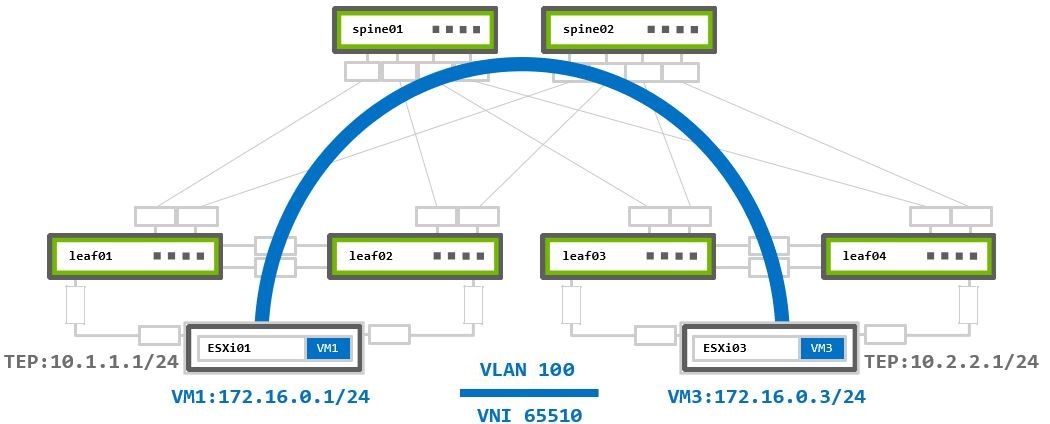
VM1 172.16.0.1 on ESXi01 sends traffic to VM3 172.16.0.3 on ESXi03:
- The packet reaches the local hypervisor’s TEP device
10.1.1.1. - The local TEP device encapsulates it into a new Geneve packet and inserts the assigned to segment VNI
65510.
The new encapsulated packet’s source IP address is the local TEP IP10.1.1.1, and the destination IP address is the remote TEP device10.2.2.1. - The encapsulated packet is routed to the remote TEP device through the underlay network.
- The remote TEP device (ESXi03) receives and decapsulates the Geneve encapsulated packet.
- The traffic forwarded to the destination VM3 based on the VNI inside the Geneve header.
Layer 3 Virtualized Traffic
This scenario examines two segments (logical switches) with two VMs assigned to each. A unique VNI is assigned to each segment.
For communication between segments, or as VMware calls it “east-west traffic” traffic, the traffic must be routed using a Tier 1 Gateway (T1 Router). The T1 Router is a logical distributed router which exists in each ESXi hypervisors and connects to each of the logical segments. It is the segment’s default gateway and routes traffic between different segments.
Routing in VMware environments always done as close to the source as possible.
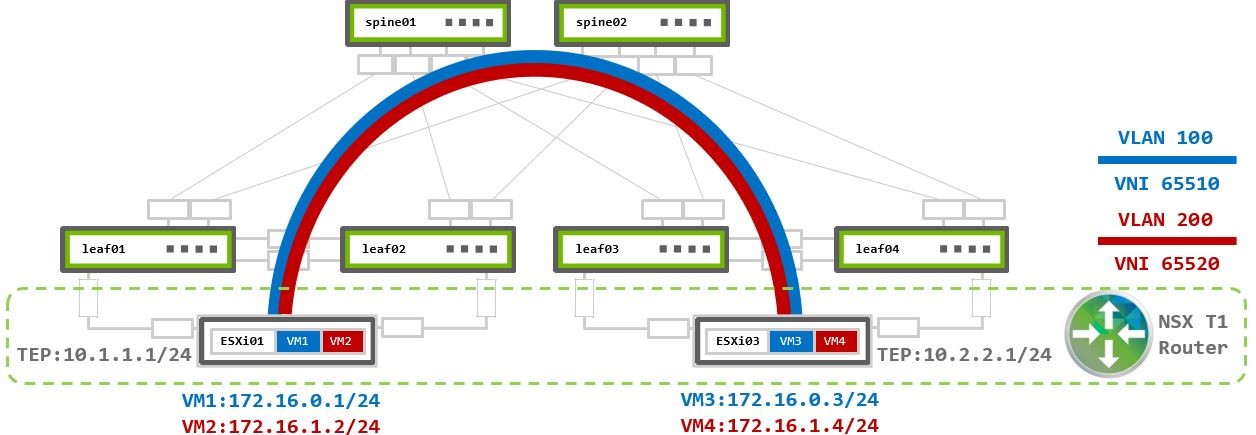
VM1 and VM3 are in VLAN100 172.16.0.0/24 - VNI 65510.
VM2 and VM4 are in VLAN200 172.16.1.0/24 - VNI 65520.
Both segments assigned to the same Overlay TZ which uses the same TEP VLAN (with TEP IPs 10.1.1.0 and 10.2.2.1) to establish overlay Geneve tunnel between the physical ESXi01 and ESX03 hypervisors. No additional configuration is required on the switches.
Traffic within the same segment handled the same way as Layer 2 Virtualized Traffic scenario.
Multiple T1 routers may be used for load balancing across segments. Then those routers connected using Tier-0 Gateway (T0 Router). T1-to-T0 routers model is described in the traffic flows section of Virtual and bare metal Server Environments.
VM1 172.16.0.1 on ESXi01 sends traffic to VM4 172.16.1.4 on ESXi03:
- Inside ESXi01 a routed packet arrives at the local T1 router.
- The T1 router examines its routing table to determine the destination path.
- As
VLAN200segment is also attached to the same T1 router, the packet is routed into the destination VLAN200 segment. - The local TEP then encapsulates the packet into Geneve using VNI
65520ofVLAN200segment. The Geneve packet’s source and destination IP addresses are of the TEP devices10.1.1.1and10.2.2.1). - The encapsulated packet sent to remote TEP device over the Geneve overlay tunnel based on the underlay IP fabric BGP routing.
- Remote TEP device (ESXi03) receives and decapsulates the Geneve encapsulated packet.
- The traffic forwarded to the destination VM4 based on the VNI inside the Geneve header.
Virtualized and Bare Metal Server Environment
This use case covers VMware virtualized environment with the need to connect to a bare metal (BM) server. This could the when the virtualized environment deployed as part of an already existing fabric (brownfield) and VMs need to communicate with a legacy or any other server which doesn’t run VMs (not part of the virtualized world).
In cases where VMs needs to communicate with non-NSX (bare metal) servers an NSX Edge deployment is required. The NSX Edge is a gateway between the virtualized Geneve overlay and the outside physical underlay. It acts as TEP device and as underlay router by establishing BGP (or OSPF) peering with the underlay fabric to route traffic in and out of the virtualized environment.
There is an option for VM to bare metal communication using Geneve encapsulation that is described in the NSX Edge on Bare Metal. This is beyond the scope of this guide.
The example configurations are based on the following topology:
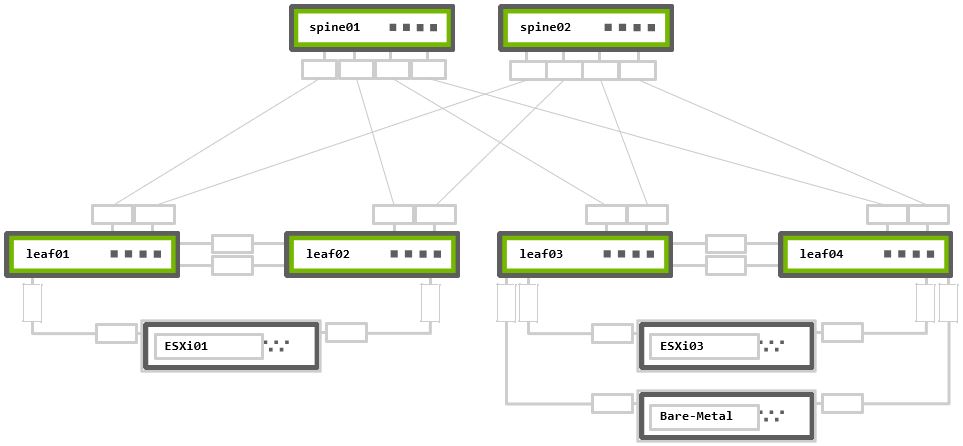
Rack 1 – Two NVIDIA Switches in MLAG + One ESXi hypervisor connected in active-active bonding
Rack 2 – Two NVIDIA Switches in MLAG + One ESXi hypervisor and One bare metal server, both connected in active-active bonding
The configurations to support an NSX Edge node are nearly identical to the existing ESXi configurations previously described. Only the required changes to support an NSX Edge device are described below.
VRR Configuration
NSX Edge uses two additional virtual uplinks (VLANs) to communicate with the physical world. One VLAN is used to provide connectivity to the underlay physical network while the second VLAN connects to the virtual overlay network. NSX Edge nodes do not support LACP bonding. To provide load balancing each VLAN will be configured over a single link to a single top of rack switch.
The following example utilizes Subinterfaces.
VLANs may also also be configured for NSX Edge node connectivity. There is no technical reason to choose VLANs or subinterfaces.
cumulus@leaf03:mgmt:~$ net add vlan 100                                                       ### TEP VLAN
cumulus@leaf03:mgmt:~$ net add vlan 100 ip address 10.2.2.252/24                              ### TEP SVI
cumulus@leaf03:mgmt:~$ net add vlan 100 ip address-virtual 00:00:00:01:00:00 10.2.2.254/24    ### TEP VRR (GW)
cumulus@leaf03:mgmt:~$ net add vlan 200                                                       ### BM VLAN
cumulus@leaf03:mgmt:~$ net add vlan 200 ip address 192.168.0.252/24                           ### BM SVI
cumulus@leaf03:mgmt:~$ net add vlan 200 ip address-virtual 00:00:00:19:21:68 192.168.0.254/24 ### BM VRR (GW)
cumulus@leaf03:mgmt:~$ net add interface swp1.30 ip address 10.30.0.254/24                    ### Edge VLAN30 subinterface
cumulus@leaf03:mgmt:~$ net commit
cumulus@leaf04:mgmt:~$ net add vlan 100                                                       ### TEP VLAN
cumulus@leaf04:mgmt:~$ net add vlan 100 ip address 10.2.2.253/24                              ### TEP SVI
cumulus@leaf04:mgmt:~$ net add vlan 100 ip address-virtual 00:00:00:01:00:00 10.2.2.254/24    ### TEP VRR (GW)
cumulus@leaf04:mgmt:~$ net add vlan 200                                                       ### BM VLAN
cumulus@leaf04:mgmt:~$ net add vlan 200 ip address 192.168.0.253/24                           ### BM SVI
cumulus@leaf04:mgmt:~$ net add vlan 200 ip address-virtual 00:00:00:19:21:68 192.168.0.254/24 ### BM VRR (GW)
cumulus@leaf04:mgmt:~$ net add interface swp1.31 ip address 10.31.0.254/24                    ### Edge VLAN31 subinterface
cumulus@leaf04:mgmt:~$ net commit
VRR and Subinterfaces Configuration Verification
The net show interface output displays the SVI and VRR interfaces as vlanXXX and vlanXXX-v0. It shows subinterfaces as swpX.xx
cumulus@leaf03:mgmt:~$ net show interface
State  Name           Spd  MTU    Mode          LLDP                          Summary
-----  -------------  ---  -----  ------------  ----------------------------  ---------------------------
UP     lo             N/A  65536  Loopback                                    IP: 127.0.0.1/8
       lo                                                                     IP: ::1/128
UP     eth0           1G   1500   Mgmt          oob-mgmt-switch (swp12)       Master: mgmt(UP)
       eth0                                                                   IP: 192.168.200.13/24(DHCP)
UP     swp1           1G   9216   BondMember    esxi03 (44:38:39:00:00:3e)    Master: esxi03(UP)
UP     swp1.30        1G   9216   SubInt/L3                                   IP: 10.30.0.254/24
UP     swp2           1G   9216   BondMember    server01 (44:38:39:00:00:40)  Master: server01(UP)
UP     swp49          1G   9216   BondMember    leaf04 (swp49)                Master: peerlink(UP)
UP     swp50          1G   9216   BondMember    leaf04 (swp50)                Master: peerlink(UP)
UP     swp51          1G   9216   Default       spine01 (swp3)
UP     swp52          1G   9216   Default       spine02 (swp3)
UP     bridge         N/A  9216   Bridge/L2
UP     esxi03         1G   9216   802.3ad                                     Master: bridge(UP)
       esxi03                                                                 Bond Members: swp1(UP)
UP     mgmt           N/A  65536  VRF                                         IP: 127.0.0.1/8
UP     peerlink       2G   9216   802.3ad                                     Master: bridge(UP)
       peerlink                                                               Bond Members: swp49(UP)
       peerlink                                                               Bond Members: swp50(UP)
UP     peerlink.4094  2G   9216   Default
UP     server01       1G   9216   802.3ad                                     Master: bridge(UP)
       server01                                                               Bond Members: swp2(UP)
UP     vlan100        N/A  9216   Interface/L3                                IP: 10.2.2.252/24
UP     vlan100-v0     N/A  9216   Interface/L3                                IP: 10.2.2.254/24
UP     vlan200        N/A  9216   Interface/L3                                IP: 192.168.0.252/24
UP     vlan200-v0     N/A  9216   Interface/L3                                IP: 192.168.0.254/24
cumulus@leaf04:mgmt:~$ net show interface
State  Name           Spd  MTU    Mode          LLDP                          Summary
-----  -------------  ---  -----  ------------  ----------------------------  ---------------------------
UP     lo             N/A  65536  Loopback                                    IP: 127.0.0.1/8
       lo                                                                     IP: ::1/128
UP     eth0           1G   1500   Mgmt          oob-mgmt-switch (swp13)       Master: mgmt(UP)
       eth0                                                                   IP: 192.168.200.14/24(DHCP)
UP     swp1           1G   9216   BondMember    esxi03 (44:38:39:00:00:44)    Master: esxi03(UP)
UP     swp1.31        1G   9216   SubInt/L3                                   IP: 10.31.0.254/24
UP     swp2           1G   9216   BondMember    server01 (44:38:39:00:00:46)  Master: server01(UP)
UP     swp49          1G   9216   BondMember    leaf03 (swp49)                Master: peerlink(UP)
UP     swp50          1G   9216   BondMember    leaf03 (swp50)                Master: peerlink(UP)
UP     swp51          1G   9216   Default       spine01 (swp4)
UP     swp52          1G   9216   Default       spine02 (swp4)
UP     bridge         N/A  9216   Bridge/L2
UP     esxi03         1G   9216   802.3ad                                     Master: bridge(UP)
       esxi03                                                                 Bond Members: swp1(UP)
UP     mgmt           N/A  65536  VRF                                         IP: 127.0.0.1/8
UP     peerlink       2G   9216   802.3ad                                     Master: bridge(UP)
       peerlink                                                               Bond Members: swp49(UP)
       peerlink                                                               Bond Members: swp50(UP)
UP     peerlink.4094  2G   9216   Default
UP     server01       1G   9216   802.3ad                                     Master: bridge(UP)
       server01                                                               Bond Members: swp2(UP)
UP     vlan100        N/A  9216   Interface/L3                                IP: 10.2.2.253/24
UP     vlan100-v0     N/A  9216   Interface/L3                                IP: 10.2.2.254/24
UP     vlan200        N/A  9216   Interface/L3                                IP: 192.168.0.253/24
UP     vlan200-v0     N/A  9216   Interface/L3                                IP: 192.168.0.254/24
BGP Configuration
All underlay IP fabric BGP peerings in this guide use eBGP as the basis for the configuration. The example configurations use Cumulus Linux Auto BGP and BGP Unnumbered configurations.
You must configure the subinterfaces on leaf03 and leaf04 with unique IPv4 addresses. NSX Edge nodes to not support BGP unnumbered.
Auto BGP configuration is only available using NCLU. If you want to use vtysh configuration, you must configure a BGP ASN.
For additional details refer to the Configuring FRRouting documentation.
BGP Peerings Establishment
The only change from the previous configurations is to add numbered BGP peerings from the leaf notes to the Edge Node server.
cumulus@leaf03:mgmt:~$ net add bgp autonomous-system leaf
cumulus@leaf03:mgmt:~$ net add bgp neighbor peerlink.4094 remote-as external
cumulus@leaf03:mgmt:~$ net add bgp neighbor swp51 remote-as external
cumulus@leaf03:mgmt:~$ net add bgp neighbor swp52 remote-as external
cumulus@leaf03:mgmt:~$ net add bgp neighbor 10.30.0.1 remote-as 65555            ### BGP to Edge VM in ASN 65555
cumulus@leaf03:mgmt:~$ net add bgp router-id 10.10.10.3
cumulus@leaf03:mgmt:~$ net commit
cumulus@leaf04:mgmt:~$ net add bgp autonomous-system leaf
cumulus@leaf04:mgmt:~$ net add bgp neighbor peerlink.4094 remote-as external
cumulus@leaf04:mgmt:~$ net add bgp neighbor swp51 remote-as external
cumulus@leaf04:mgmt:~$ net add bgp neighbor swp52 remote-as external
cumulus@leaf04:mgmt:~$ net add bgp neighbor 10.31.0.1 remote-as 65555            ### BGP to Edge VM in ASN 65555
cumulus@leaf04:mgmt:~$ net add bgp router-id 10.10.10.4
cumulus@leaf04:mgmt:~$ net commit
cumulus@leaf03:~$ sudo vtysh
leaf03# configure terminal
leaf03(config)# router bgp 65103
leaf03(config-router)# bgp router-id 10.10.10.3
leaf03(config-router)# neighbor peerlink.4094 interface remote-as external
leaf03(config-router)# neighbor swp51 remote-as external
leaf03(config-router)# neighbor swp52 remote-as external
leaf03(config-router)# neighbor 10.30.0.1 remote-as 65555
leaf03(config-router)# end
leaf03# write memory
leaf03# exit
cumulus@leaf04:~$ sudo vtysh
leaf04# configure terminal
leaf04(config)# router bgp 65101
leaf04(config-router)# bgp router-id 10.10.10.4
leaf04(config-router)# neighbor peerlink.4094 interface remote-as external
leaf04(config-router)# neighbor swp51 remote-as external
leaf04(config-router)# neighbor swp52 remote-as external
leaf04(config-router)# neighbor 10.31.0.1 remote-as 65555
leaf04(config-router)# end
leaf04# write memory
leaf04# exit
BGP Peerings and Route Advertisement Verification
To verify all BGP peerings established correctly, use the net show bgp summary command in NCLU, or show ip bgp summary in vtysh.
The numbered BGP peering to the Edge Node should appear in BGP neighbor list.
cumulus@leaf03:mgmt:~$ net show bgp summary
show bgp ipv4 unicast summary
=============================
BGP router identifier 10.10.10.3, local AS number 4259632661 vrf-id 0
BGP table version 2
RIB entries 3, using 576 bytes of memory
Peers 3, using 64 KiB of memory

Neighbor              V         AS   MsgRcvd   MsgSent   TblVer  InQ OutQ  Up/Down State/PfxRcd   PfxSnt
leaf04(peerlink.4094) 4 4259632667     50465     50468        0    0    0 00:22:41            5        6
spine01(swp51)        4 4200000000     50480     50503        0    0    0 00:22:54            3        6
spine02(swp52)        4 4200000000     50466     50491        0    0    0 00:22:35            4        6
10.30.0.1             4 65555           1023      1035        0    0    0 00:11:23            2        6

Total number of neighbors 3
cumulus@leaf04:mgmt:~$ net show bgp summary
show bgp ipv4 unicast summary
=============================
BGP router identifier 10.10.10.4, local AS number 4259632667 vrf-id 0
BGP table version 3
RIB entries 3, using 576 bytes of memory
Peers 3, using 64 KiB of memory

Neighbor              V         AS   MsgRcvd   MsgSent   TblVer  InQ OutQ  Up/Down State/PfxRcd   PfxSnt
leaf03(peerlink.4094) 4 4259632661     25231     25236        0    0    0 00:25:44            5        6
spine01(swp51)        4 4200000000     25232     25236        0    0    0 00:25:45            5        6
spine02(swp52)        4 4200000000     25233     25228        0    0    0 00:25:41            4        6
10.31.0.1             4 65555           1056      1076        0    0    0 00:11:35            2        6

Total number of neighbors 3
Traffic Flow
This scenario examines a VM assigned to a logical segment, VLAN100, in the virtualized network, a bare metal server in VLAN200, in the underlay network, and NSX Edge VM located on ESXi03 host. The Edge VM is the gateway between the virtual and the physical networks (“north-south” traffic in VMware terminology) and uses two logical uplinks in VLANs 30 and 31 which has BGP peering to the underlay leaf switches to route VM to bare metal traffic.
This diagram also has both tier 0 and tier 1 routers. The T0 router has BGP peerings with the leaf switches and advertises the Overlay network routes. The T1 router is the gateway for virtual hosts.
T0 router has logical downlink to T1, and two logical uplinks to the leaf switches in the physical world through VLAN30 and VLAN31.
The T1 router has a logical downlink into the virtual segment, and a logical uplink to the T0 router.
NSX automatically creates the links between the T1-T0 routers and the T0 router must advertise them into the underlay BGP network.
NSX Edge VM has virtual NICs (vNICs) in each of the Overlay and VLAN Transport Zones. It receives Geneve encapsulated traffic via the TEP device in Overlay TZ (east-west traffic) and forward it to the VLAN TZ by T0 (north-south traffic).
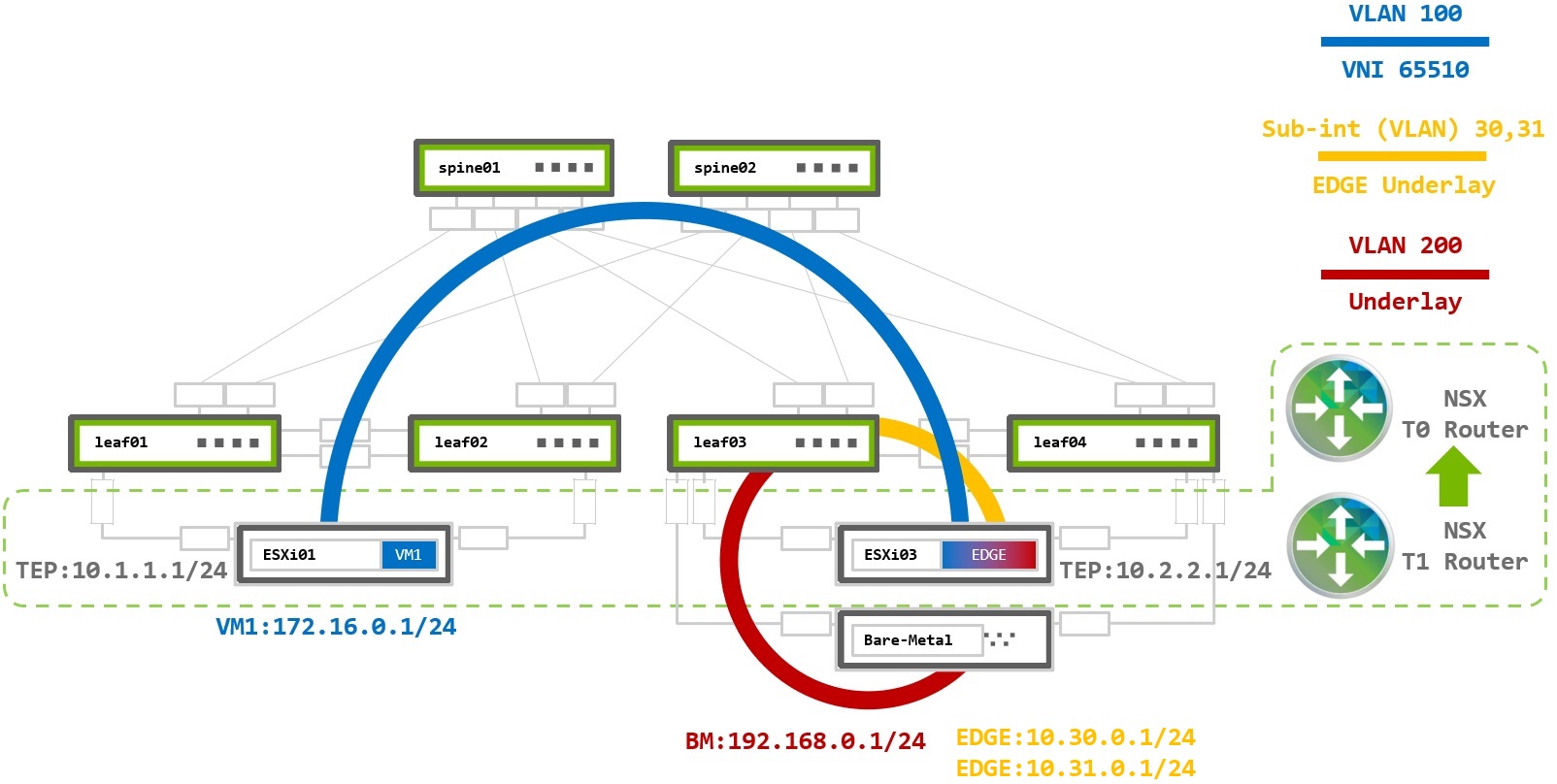
As an example traffic flow, VM1 at 172.16.0.1 on ESXi01 sends traffic to the bare metal server 192.168.0.1:
- The packet from VM1 arrives at the local T1 Router, VM1’s default gateway.
- The T1 router examines its routing table to determine the destination path.
- The bare metal subnet of
192.168.0.0/24was received from the T0 router, and becomes the next hop via a Geneve tunnel. - Local TEP on ESXi01 encapsulates the packet into Geneve using VNI
65010for theVLAN100segment. The destination is the T0 router on the Edge, ESXi03. - The packet is sent to ESXi03 with source and destination IPs of the TEP devices
10.1.1.1and10.2.2.1. - The Edge TEP decapsulates the packet and forwards it to the T0 router also located inside host ESXi03.
- The T0 router receives an IP packet with destination address
192.168.0.1and has a next hop via the BGP peer on leaf03. - The packet is sent to leaf03 in VLAN30, where it is routed to VLAN200 and delivered to the bare metal server.
Virtualized Environment Over EVPN Fabric
EVPN Underlay Fabric
The previous examples discussed deploying NSX on a pure IP fabric. Modern datacenters are often designed using EVPN to support multi-tenancy and layer 2 extension without VMware NSX. When NSX is deployed over an EVPN fabric it works in an identical fashion as when it is deployed in a pure IP fabric. NSX operates independently from the EVPN
When using an EVPN underlay fabric, the NSX generated Geneve packets are encapsulated into VXLAN packets on the leaf switches and transmitted over the network. When using an EVPN deployment, the simplies deployment option is to configure all TEP addresses in the same subnet and use VXLAN layer 2 extension to provide TEP to TEP connectivity.
Unique subnets can be used across TEP devices in an EVPN network, however, VXLAN routing must be configured in the underlay network. This deployment model is beyond the scope of this guide. For more information reference the EVPN Inter-subnet Routing documentation.
Switches configuration below based on layer 2 bridging with VXLAN Active-active Mode over BGP-EVPN underlay.
TEP VLAN Configuration
When all TEP IP addresses exist within the same subnet, the TEP VLAN default-gateway is not required.
A VXLAN tunnel (VNI) must be configured to map the TEP VLAN to the VXLAN VNI to provide connectivity across the underlay network.
VXLAN Tunnel Endpoints (VTEPs) use local loopback IP address as the tunnel source and destination. Loopback interfaces must be configured on all leaf switches and then advertised via BGP into the underlay. When using MLAG, this is referred to as VXLAN active-active and clag vxlan-anycast-ip must be configured. This causes the MLAG peers to have the same VTEP IP address which is used as the inbound VXLAN tunnel destination. Spine switches do not require any VXLAN specific configuration but must enable the BGP l2vpn evpn address family with the leaf peers.
MLAG and VXLAN Configuration
EVPN MLAG Configuration
No modifications are required to configure MLAG for EVPN. For specific MLAG configurations reference the earlier MLAG Configuration section.
For non-MLAG uplinks, use interfaces configuration from Pure Virtualized Environment Switch Ports Configuration - Non-LAG N-VDS Uplink Profile.
VXLAN Configuration
Each leaf requires a unique Loopback IP to be advertised into the underlay network. The vxlan-anycast-ip must also be configured with the MLAG-peer switch.
The VLAN (100) assigned to the MLAG bond must be mapped to a VXLAN tunnel VNI.
To configure the Loopback IPs and VXLAN interfaces:
Configure the Loopback IP and anycast IP.
cumulus@leaf01:mgmt:~$ net add loopback lo ip address 10.10.10.1/32
cumulus@leaf01:mgmt:~$ net add loopback lo clag vxlan-anycast-ip 10.0.1.1
Create the VXLAN tunnel and map it to VLAN 100.
cumulus@leaf01:mgmt:~$ net add vxlan vxlan100 vxlan id 100100
cumulus@leaf01:mgmt:~$ net add vxlan vxlan100 vxlan local-tunnelip 10.10.10.1
cumulus@leaf01:mgmt:~$ net add vxlan vxlan100 bridge access 100
cumulus@leaf01:mgmt:~$ net add vxlan vxlan100 bridge arp-nd-suppress on
cumulus@leaf01:mgmt:~$ net add vxlan vxlan100 stp bpduguard
cumulus@leaf01:mgmt:~$ net add vxlan vxlan100 stp portbpdufilter
cumulus@leaf01:mgmt:~$ net commit
Configure the Loopback IP and anycast IP.
cumulus@leaf02:mgmt:~$ net add loopback lo ip address 10.10.10.2/32
cumulus@leaf02:mgmt:~$ net add loopback lo clag vxlan-anycast-ip 10.0.1.1
Create the VXLAN tunnel and map it to VLAN 100.
cumulus@leaf02:mgmt:~$ net add vxlan vxlan100 vxlan id 100100
cumulus@leaf02:mgmt:~$ net add vxlan vxlan100 vxlan local-tunnelip 10.10.10.2
cumulus@leaf02:mgmt:~$ net add vxlan vxlan100 bridge access 100
cumulus@leaf02:mgmt:~$ net add vxlan vxlan100 bridge arp-nd-suppress on
cumulus@leaf02:mgmt:~$ net add vxlan vxlan100 stp bpduguard
cumulus@leaf02:mgmt:~$ net add vxlan vxlan100 stp portbpdufilter
cumulus@leaf02:mgmt:~$ net commit
Configure the Loopback IP and anycast IP.
cumulus@leaf03:mgmt:~$ net add loopback lo ip address 10.10.10.3/32
cumulus@leaf03:mgmt:~$ net add loopback lo clag vxlan-anycast-ip 10.0.1.2
Create the VXLAN tunnel and map it to VLAN 100.
cumulus@leaf03:mgmt:~$ net add vxlan vxlan100 vxlan id 100100
cumulus@leaf03:mgmt:~$ net add vxlan vxlan100 vxlan local-tunnelip 10.10.10.3
cumulus@leaf03:mgmt:~$ net add vxlan vxlan100 bridge access 100
cumulus@leaf03:mgmt:~$ net add vxlan vxlan100 bridge arp-nd-suppress on
cumulus@leaf03:mgmt:~$ net add vxlan vxlan100 stp bpduguard
cumulus@leaf03:mgmt:~$ net add vxlan vxlan100 stp portbpdufilter
cumulus@leaf03:mgmt:~$ net commit
Configure the Loopback IP and anycast IP.
cumulus@leaf04:mgmt:~$ net add loopback lo ip address 10.10.10.4/32
cumulus@leaf04:mgmt:~$ net add loopback lo clag vxlan-anycast-ip 10.0.1.2
Create the VXLAN tunnel and map it to VLAN 100.
cumulus@leaf04:mgmt:~$ net add vxlan vxlan100 vxlan id 100100
cumulus@leaf04:mgmt:~$ net add vxlan vxlan100 vxlan local-tunnelip 10.10.10.4
cumulus@leaf04:mgmt:~$ net add vxlan vxlan100 bridge access 100
cumulus@leaf04:mgmt:~$ net add vxlan vxlan100 bridge arp-nd-suppress on
cumulus@leaf04:mgmt:~$ net add vxlan vxlan100 stp bpduguard
cumulus@leaf04:mgmt:~$ net add vxlan vxlan100 stp portbpdufilter
cumulus@leaf04:mgmt:~$ net commit
VXLAN Verification
The net show interface command shows the created VXLAN interfaces seen below as vxlanXXX (which are in layer 2 access mode), and MLAG interfaces esxi01 and esxi03 of LACP 802.3ad type bonds. The loopback interface appears at lo and lists both the uniquely configured loopback IP as well as the assigned VXLAN anycast address.
cumulus@leaf01:mgmt:~$ net show interface
State  Name           Spd  MTU    Mode           LLDP                          Summary
-----  -------------  ---  -----  -------------  ----------------------------  ---------------------------
UP     lo             N/A  65536  Loopback                                     IP: 127.0.0.1/8
       lo                                                                      IP: 10.10.10.1/32
       lo                                                                      IP: 10.0.1.1/32
       lo                                                                      IP: ::1/128
UP     eth0           1G   1500   Mgmt           oob-mgmt-switch (swp10)       Master: mgmt(UP)
       eth0                                                                    IP: 192.168.200.11/24(DHCP)
UP     swp1           1G   9216   BondMember     esxi01 (44:38:39:00:00:32)    Master: esxi01(UP)
UP     swp49          1G   9216   BondMember     leaf02 (swp49)                Master: peerlink(UP)
UP     swp50          1G   9216   BondMember     leaf02 (swp50)                Master: peerlink(UP)
UP     swp51          1G   9216   BGPUnnumbered  spine01 (swp1)
UP     swp52          1G   9216   BGPUnnumbered  spine02 (swp1)
UP     bridge         N/A  9216   Bridge/L2
UP     esxi01         1G   9216   802.3ad                                      Master: bridge(UP)
       esxi01                                                                  Bond Members: swp1(UP)
UP     mgmt           N/A  65536  VRF                                          IP: 127.0.0.1/8
UP     peerlink       2G   9216   802.3ad                                      Master: bridge(UP)
       peerlink                                                                Bond Members: swp49(UP)
       peerlink                                                                Bond Members: swp50(UP)
UP     peerlink.4094  2G   9216   BGPUnnumbered
UP     vxlan100       N/A  9216   Access/L2                                    Master: bridge(UP)
cumulus@leaf02:mgmt:~$ net show interface
State  Name           Spd  MTU    Mode           LLDP                          Summary
-----  -------------  ---  -----  -------------  ----------------------------  ---------------------------
UP     lo             N/A  65536  Loopback                                     IP: 127.0.0.1/8
       lo                                                                      IP: 10.10.10.2/32
       lo                                                                      IP: 10.0.1.1/32
       lo                                                                      IP: ::1/128
UP     eth0           1G   1500   Mgmt           oob-mgmt-switch (swp11)       Master: mgmt(UP)
       eth0                                                                    IP: 192.168.200.12/24(DHCP)
UP     swp1           1G   9216   BondMember     esxi01 (44:38:39:00:00:38)    Master: esxi01(UP)
UP     swp49          1G   9216   BondMember     leaf01 (swp49)                Master: peerlink(UP)
UP     swp50          1G   9216   BondMember     leaf01 (swp50)                Master: peerlink(UP)
UP     swp51          1G   9216   BGPUnnumbered  spine01 (swp2)
UP     swp52          1G   9216   BGPUnnumbered  spine02 (swp2)
UP     bridge         N/A  9216   Bridge/L2
UP     esxi01         1G   9216   802.3ad                                      Master: bridge(UP)
       esxi01                                                                  Bond Members: swp1(UP)
UP     mgmt           N/A  65536  VRF                                          IP: 127.0.0.1/8
UP     peerlink       2G   9216   802.3ad                                      Master: bridge(UP)
       peerlink                                                                Bond Members: swp49(UP)
       peerlink                                                                Bond Members: swp50(UP)
UP     peerlink.4094  2G   9216   BGPUnnumbered
UP     vxlan100       N/A  9216   Access/L2                                    Master: bridge(UP)
cumulus@leaf03:mgmt:~$ net show interface
State  Name           Spd  MTU    Mode           LLDP                          Summary
-----  -------------  ---  -----  -------------  ----------------------------  ---------------------------
UP     lo             N/A  65536  Loopback                                     IP: 127.0.0.1/8
       lo                                                                      IP: 10.10.10.3/32
       lo                                                                      IP: 10.0.1.2/32
       lo                                                                      IP: ::1/128
UP     eth0           1G   1500   Mgmt           oob-mgmt-switch (swp12)       Master: mgmt(UP)
       eth0                                                                    IP: 192.168.200.13/24(DHCP)
UP     swp1           1G   9216   BondMember     esxi03 (44:38:39:00:00:3e)    Master: esxi03(UP)
UP     swp49          1G   9216   BondMember     leaf04 (swp49)                Master: peerlink(UP)
UP     swp50          1G   9216   BondMember     leaf04 (swp50)                Master: peerlink(UP)
UP     swp51          1G   9216   BGPUnnumbered  spine01 (swp3)
UP     swp52          1G   9216   BGPUnnumbered  spine02 (swp3)
UP     bridge         N/A  9216   Bridge/L2
UP     esxi03         1G   9216   802.3ad                                      Master: bridge(UP)
       esxi03                                                                  Bond Members: swp1(UP)
UP     mgmt           N/A  65536  VRF                                          IP: 127.0.0.1/8
UP     peerlink       2G   9216   802.3ad                                      Master: bridge(UP)
       peerlink                                                                Bond Members: swp49(UP)
       peerlink                                                                Bond Members: swp50(UP)
UP     peerlink.4094  2G   9216   BGPUnnumbered
UP     vxlan100       N/A  9216   Access/L2                                    Master: bridge(UP)
cumulus@leaf04:mgmt:~$ net show interface
State  Name           Spd  MTU    Mode           LLDP                          Summary
-----  -------------  ---  -----  -------------  ----------------------------  ---------------------------
UP     lo             N/A  65536  Loopback                                     IP: 127.0.0.1/8
       lo                                                                      IP: 10.10.10.4/32
       lo                                                                      IP: 10.0.1.2/32
       lo                                                                      IP: ::1/128
UP     eth0           1G   1500   Mgmt           oob-mgmt-switch (swp13)       Master: mgmt(UP)
       eth0                                                                    IP: 192.168.200.14/24(DHCP)
UP     swp1           1G   9216   BondMember     esxi03 (44:38:39:00:00:44)    Master: esxi03(UP)
UP     swp49          1G   9216   BondMember     leaf03 (swp49)                Master: peerlink(UP)
UP     swp50          1G   9216   BondMember     leaf03 (swp50)                Master: peerlink(UP)
UP     swp51          1G   9216   BGPUnnumbered  spine01 (swp4)
UP     swp52          1G   9216   BGPUnnumbered  spine02 (swp4)
UP     bridge         N/A  9216   Bridge/L2
UP     esxi03         1G   9216   802.3ad                                      Master: bridge(UP)
       esxi03                                                                  Bond Members: swp1(UP)
UP     mgmt           N/A  65536  VRF                                          IP: 127.0.0.1/8
UP     peerlink       2G   9216   802.3ad                                      Master: bridge(UP)
       peerlink                                                                Bond Members: swp49(UP)
       peerlink                                                                Bond Members: swp50(UP)
UP     peerlink.4094  2G   9216   BGPUnnumbered
UP     vxlan100       N/A  9216   Access/L2                                    Master: bridge(UP)
MLAG and VXLAN Interfaces Configuration Verification
You define VXLAN interfaces as active-active on both MLAG peers. You can view them with the other MLAG bonds by running net show clag.
cumulus@leaf01:mgmt:~$ net show clag
The peer is alive
     Our Priority, ID, and Role: 1000 44:38:39:00:00:59 primary
    Peer Priority, ID, and Role: 2000 44:38:39:00:00:5a secondary
          Peer Interface and IP: peerlink.4094 fe80::4638:39ff:fe00:5a (linklocal)
               VxLAN Anycast IP: 10.0.1.1
                      Backup IP: 192.168.200.12 vrf mgmt (active)
                     System MAC: 44:38:39:ff:00:01

CLAG Interfaces
Our Interface      Peer Interface     CLAG Id   Conflicts              Proto-Down Reason
----------------   ----------------   -------   --------------------   -----------------
          esxi01   esxi01             1         -                      -
        vxlan100   vxlan100           -         -                      -
cumulus@leaf02:mgmt:~$ net show clag
The peer is alive
     Our Priority, ID, and Role: 2000 44:38:39:00:00:5a secondary
    Peer Priority, ID, and Role: 1000 44:38:39:00:00:59 primary
          Peer Interface and IP: peerlink.4094 fe80::4638:39ff:fe00:59 (linklocal)
               VxLAN Anycast IP: 10.0.1.1
                      Backup IP: 192.168.200.11 vrf mgmt (active)
                     System MAC: 44:38:39:ff:00:01

CLAG Interfaces
Our Interface      Peer Interface     CLAG Id   Conflicts              Proto-Down Reason
----------------   ----------------   -------   --------------------   -----------------
          esxi01   esxi01             1         -                      -
        vxlan100   vxlan100           -         -                      -
cumulus@leaf03:mgmt:~$ net show clag
The peer is alive
     Our Priority, ID, and Role: 1000 44:38:39:00:00:5d primary
    Peer Priority, ID, and Role: 2000 44:38:39:00:00:5e secondary
          Peer Interface and IP: peerlink.4094 fe80::4638:39ff:fe00:5e (linklocal)
               VxLAN Anycast IP: 10.0.1.2
                      Backup IP: 192.168.200.14 vrf mgmt (active)
                     System MAC: 44:38:39:ff:00:02

CLAG Interfaces
Our Interface      Peer Interface     CLAG Id   Conflicts              Proto-Down Reason
----------------   ----------------   -------   --------------------   -----------------
          esxi03   esxi03             1         -                      -
        vxlan100   vxlan100           -         -                      -
cumulus@leaf04:mgmt:~$ net show clag
The peer is alive
     Our Priority, ID, and Role: 2000 44:38:39:00:00:5e secondary
    Peer Priority, ID, and Role: 1000 44:38:39:00:00:5d primary
          Peer Interface and IP: peerlink.4094 fe80::4638:39ff:fe00:5d (linklocal)
               VxLAN Anycast IP: 10.0.1.2
                      Backup IP: 192.168.200.13 vrf mgmt (active)
                     System MAC: 44:38:39:ff:00:02

CLAG Interfaces
Our Interface      Peer Interface     CLAG Id   Conflicts              Proto-Down Reason
----------------   ----------------   -------   --------------------   -----------------
          esxi03   esxi03             1         -                      -
        vxlan100   vxlan100           -         -                      -
BGP Configuration
IPv4 and EVPN Peerings
You must configure BGP to advertise EVPN information over the layer 3 fabric. You must configure the BGP l2vpn evpn address-family for each BGP peer.
You can find all additional BGP configuration in the BGP Configuration section.
cumulus@leaf01:mgmt:~$ net add bgp evpn neighbor peerlink.4094 activate
cumulus@leaf01:mgmt:~$ net add bgp evpn neighbor swp51 activate
cumulus@leaf01:mgmt:~$ net add bgp evpn neighbor swp52 activate
cumulus@leaf01:mgmt:~$ net add bgp evpn advertise-all-vni
cumulus@leaf01:mgmt:~$ net commit
cumulus@leaf02:mgmt:~$ net add bgp evpn neighbor peerlink.4094 activate
cumulus@leaf02:mgmt:~$ net add bgp evpn neighbor swp51 activate
cumulus@leaf02:mgmt:~$ net add bgp evpn neighbor swp52 activate
cumulus@leaf02:mgmt:~$ net add bgp evpn advertise-all-vni
cumulus@leaf02:mgmt:~$ net commit
cumulus@leaf03:mgmt:~$ net add bgp evpn neighbor peerlink.4094 activate
cumulus@leaf03:mgmt:~$ net add bgp evpn neighbor swp51 activate
cumulus@leaf03:mgmt:~$ net add bgp evpn neighbor swp52 activate
cumulus@leaf03:mgmt:~$ net add bgp evpn advertise-all-vni
cumulus@leaf03:mgmt:~$ net commit
cumulus@leaf04:mgmt:~$ net add bgp evpn neighbor peerlink.4094 activate
cumulus@leaf04:mgmt:~$ net add bgp evpn neighbor swp51 activate
cumulus@leaf04:mgmt:~$ net add bgp evpn neighbor swp52 activate
cumulus@leaf04:mgmt:~$ net add bgp evpn advertise-all-vni
cumulus@leaf04:mgmt:~$ net commit
cumulus@spine01:mgmt:~$ net add bgp evpn neighbor swp1 activate
cumulus@spine01:mgmt:~$ net add bgp evpn neighbor swp2 activate
cumulus@spine01:mgmt:~$ net add bgp evpn neighbor swp3 activate
cumulus@spine01:mgmt:~$ net add bgp evpn neighbor swp4 activate
cumulus@spine01:mgmt:~$ net commit
cumulus@spine02:mgmt:~$ net add bgp evpn neighbor swp1 activate
cumulus@spine02:mgmt:~$ net add bgp evpn neighbor swp2 activate
cumulus@spine02:mgmt:~$ net add bgp evpn neighbor swp3 activate
cumulus@spine02:mgmt:~$ net add bgp evpn neighbor swp4 activate
cumulus@spine02:mgmt:~$ net commit
cumulus@leaf01:~$ sudo vtysh
leaf01# configure terminal
leaf01(config)# router bgp 65101
leaf01(config-router)# address-family l2vpn evpn
leaf01(config-router-af)# neighbor peerlink.4094 activate
leaf01(config-router-af)# neighbor swp51 activate
leaf01(config-router-af)# neighbor swp52 activate
leaf01(config-router-af)# advertise-all-vni
leaf01(config-router-af)# end
leaf01# write memory
leaf01# exit
cumulus@leaf03:~$ sudo vtysh
leaf02# configure terminal
leaf02(config)# router bgp 65102
leaf02(config-router)# address-family l2vpn evpn
leaf02(config-router-af)# neighbor peerlink.4094 activate
leaf02(config-router-af)# neighbor swp51 activate
leaf02(config-router-af)# neighbor swp52 activate
leaf02(config-router-af)# advertise-all-vni
leaf02(config-router-af)# end
leaf02# write memory
leaf02# exit
cumulus@leaf03:~$ sudo vtysh
leaf03# configure terminal
leaf03(config)# router bgp 65103
leaf03(config-router)# address-family l2vpn evpn
leaf03(config-router-af)# neighbor peerlink.4094 activate
leaf03(config-router-af)# neighbor swp51 activate
leaf03(config-router-af)# neighbor swp52 activate
leaf03(config-router-af)# advertise-all-vni
leaf03(config-router-af)# end
leaf03# write memory
leaf03# exit
cumulus@leaf04:~$ sudo vtysh
leaf04# configure terminal
leaf04(config)# router bgp 65101
leaf04(config-router)# address-family l2vpn evpn
leaf04(config-router-af)# neighbor peerlink.4094 activate
leaf04(config-router-af)# neighbor swp51 activate
leaf04(config-router-af)# neighbor swp52 activate
leaf04(config-router-af)# advertise-all-vni
leaf04(config-router-af)# end
leaf04# write memory
leaf04# exit
cumulus@spine01:~$ sudo vtysh
spine01# configure terminal
spine01(config)# router bgp 65199
spine01(config-router)# address-family l2vpn evpn
spine01(config-router-af)# neighbor swp1 activate
spine01(config-router-af)# neighbor swp2 activate
spine01(config-router-af)# neighbor swp3 activate
spine01(config-router-af)# neighbor swp4 activate
spine01(config-router-af)# end
spine01# write memory
spine01# exit
cumulus@spine02:~$ sudo vtysh
spine02# configure terminal
spine02(config)# router bgp 65199
spine02(config-router)# address-family l2vpn evpn
spine02(config-router-af)# neighbor swp1 activate
spine02(config-router-af)# neighbor swp2 activate
spine02(config-router-af)# neighbor swp3 activate
spine02(config-router-af)# neighbor swp4 activate
spine02(config-router-af)# end
spine02# write memory
spine02# exit
VXLAN VTEP IP Advertisement into BGP and VNI Into EVPN
VXLAN tunnels created using local loopback addresses and clag vxlan-anycast-ip must be reachable over the underlaying fabric using BGP IPv4 route advertisements.
You accomplish this by using the redistribute connected command described earlier in the BGP Configuration section.
BGP/EVPN Peerings and VTEP/VNI Advertisement Verification
BGP-EVPN peering verification is similar to IPv4 verification. Each “address-family” lists the neighbors configured and their peer states. Use net show bgp summary command in NCLU, or show ip bgp summary in vtysh to view the BGP peering table.
cumulus@leaf01:mgmt:~$ net show bgp summary
show bgp ipv4 unicast summary
=============================
BGP router identifier 10.10.10.1, local AS number 4259632651 vrf-id 0
BGP table version 96
RIB entries 11, using 2112 bytes of memory
Peers 3, using 64 KiB of memory

Neighbor              V         AS   MsgRcvd   MsgSent   TblVer  InQ OutQ  Up/Down State/PfxRcd   PfxSnt
leaf02(peerlink.4094) 4 4259632649     28055     28052        0    0    0 00:51:58            5        6
spine01(swp51)        4 4200000000     28066     28058        0    0    0 00:49:27            4        6
spine02(swp52)        4 4200000000     28070     28061        0    0    0 00:48:50            4        6

Total number of neighbors 3

show bgp l2vpn evpn summary
===========================
BGP router identifier 10.10.10.1, local AS number 4259632651 vrf-id 0
BGP table version 0
RIB entries 7, using 1344 bytes of memory
Peers 3, using 64 KiB of memory

Neighbor              V         AS   MsgRcvd   MsgSent   TblVer  InQ OutQ  Up/Down State/PfxRcd   PfxSnt
leaf02(peerlink.4094) 4 4259632649     28055     28052        0    0    0 00:51:58            2        3
spine01(swp51)        4 4200000000     28067     28059        0    0    0 00:49:27            2        3
spine02(swp52)        4 4200000000     28070     28061        0    0    0 00:48:50            2        3

Total number of neighbors 3
cumulus@leaf02:mgmt:~$ net show bgp summary
show bgp ipv4 unicast summary
=============================
BGP router identifier 10.10.10.2, local AS number 4259632649 vrf-id 0
BGP table version 89
RIB entries 11, using 2112 bytes of memory
Peers 3, using 64 KiB of memory

Neighbor              V         AS   MsgRcvd   MsgSent   TblVer  InQ OutQ  Up/Down State/PfxRcd   PfxSnt
leaf01(peerlink.4094) 4 4259632651     28032     28045        0    0    0 00:51:23            5        6
spine01(swp51)        4 4200000000     28044     28044        0    0    0 00:48:53            5        6
spine02(swp52)        4 4200000000     28064     28050        0    0    0 00:48:16            5        6

Total number of neighbors 3

show bgp l2vpn evpn summary
===========================
BGP router identifier 10.10.10.2, local AS number 4259632649 vrf-id 0
BGP table version 0
RIB entries 7, using 1344 bytes of memory
Peers 3, using 64 KiB of memory

Neighbor              V         AS   MsgRcvd   MsgSent   TblVer  InQ OutQ  Up/Down State/PfxRcd   PfxSnt
leaf01(peerlink.4094) 4 4259632651     28032     28045        0    0    0 00:51:24            2        3
spine01(swp51)        4 4200000000     28044     28044        0    0    0 00:48:54            2        3
spine02(swp52)        4 4200000000     28064     28050        0    0    0 00:48:17            2        3

Total number of neighbors 3
cumulus@leaf03:mgmt:~$ net show bgp summary
show bgp ipv4 unicast summary
=============================
BGP router identifier 10.10.10.3, local AS number 4259632661 vrf-id 0
BGP table version 85
RIB entries 11, using 2112 bytes of memory
Peers 3, using 64 KiB of memory

Neighbor              V         AS   MsgRcvd   MsgSent   TblVer  InQ OutQ  Up/Down State/PfxRcd   PfxSnt
leaf04(peerlink.4094) 4 4259632667     53298     53295        0    0    0 00:48:56            5        6
spine01(swp51)        4 4200000000     53309     53327        0    0    0 00:47:12            4        6
spine02(swp52)        4 4200000000     53317     53320        0    0    0 00:46:34            4        6

Total number of neighbors 3

show bgp l2vpn evpn summary
===========================
BGP router identifier 10.10.10.3, local AS number 4259632661 vrf-id 0
BGP table version 0
RIB entries 7, using 1344 bytes of memory
Peers 3, using 64 KiB of memory

Neighbor              V         AS   MsgRcvd   MsgSent   TblVer  InQ OutQ  Up/Down State/PfxRcd   PfxSnt
leaf04(peerlink.4094) 4 4259632667     53298     53295        0    0    0 00:48:57            2        3
spine01(swp51)        4 4200000000     53309     53327        0    0    0 00:47:13            2        3
spine02(swp52)        4 4200000000     53317     53320        0    0    0 00:46:35            2        3

Total number of neighbors 3
cumulus@leaf04:mgmt:~$ net show bgp summary
show bgp ipv4 unicast summary
=============================
BGP router identifier 10.10.10.4, local AS number 4259632667 vrf-id 0
BGP table version 74
RIB entries 11, using 2112 bytes of memory
Peers 3, using 64 KiB of memory

Neighbor              V         AS   MsgRcvd   MsgSent   TblVer  InQ OutQ  Up/Down State/PfxRcd   PfxSnt
leaf03(peerlink.4094) 4 4259632661     27978     27990        0    0    0 00:48:07            5        6
spine01(swp51)        4 4200000000     27997     27994        0    0    0 00:46:23            5        6
spine02(swp52)        4 4200000000     28009     27995        0    0    0 00:45:45            5        6

Total number of neighbors 3

show bgp l2vpn evpn summary
===========================
BGP router identifier 10.10.10.4, local AS number 4259632667 vrf-id 0
BGP table version 0
RIB entries 7, using 1344 bytes of memory
Peers 3, using 64 KiB of memory

Neighbor              V         AS   MsgRcvd   MsgSent   TblVer  InQ OutQ  Up/Down State/PfxRcd   PfxSnt
leaf03(peerlink.4094) 4 4259632661     27978     27990        0    0    0 00:48:07            2        3
spine01(swp51)        4 4200000000     27997     27994        0    0    0 00:46:23            2        3
spine02(swp52)        4 4200000000     28010     27996        0    0    0 00:45:45            2        3

Total number of neighbors 3
cumulus@spine01:mgmt:~$ net show bgp summary
show bgp ipv4 unicast summary
=============================
BGP router identifier 10.10.10.101, local AS number 4200000000 vrf-id 0
BGP table version 165
RIB entries 11, using 2112 bytes of memory
Peers 4, using 85 KiB of memory

Neighbor        V         AS   MsgRcvd   MsgSent   TblVer  InQ OutQ  Up/Down State/PfxRcd   PfxSnt
leaf01(swp1)    4 4259632651     88151     88190        0    0    0 00:49:55            3        6
leaf02(swp2)    4 4259632649     88154     88213        0    0    0 00:49:55            3        6
leaf03(swp3)    4 4259632661     88206     88256        0    0    0 00:49:55            3        6
leaf04(swp4)    4 4259632667     88207     88266        0    0    0 00:49:55            3        6

Total number of neighbors 4

show bgp l2vpn evpn summary
===========================
BGP router identifier 10.10.10.101, local AS number 4200000000 vrf-id 0
BGP table version 0
RIB entries 7, using 1344 bytes of memory
Peers 4, using 85 KiB of memory

Neighbor        V         AS   MsgRcvd   MsgSent   TblVer  InQ OutQ  Up/Down State/PfxRcd   PfxSnt
leaf01(swp1)    4 4259632651     88151     88190        0    0    0 00:49:55            1        4
leaf02(swp2)    4 4259632649     88154     88213        0    0    0 00:49:55            1        4
leaf03(swp3)    4 4259632661     88206     88256        0    0    0 00:49:55            1        4
leaf04(swp4)    4 4259632667     88207     88266        0    0    0 00:49:55            1        4

Total number of neighbors 4
cumulus@spine02:mgmt:~$ net show bgp summary
show bgp ipv4 unicast summary
=============================
BGP router identifier 10.10.10.102, local AS number 4200000000 vrf-id 0
BGP table version 112
RIB entries 11, using 2112 bytes of memory
Peers 4, using 85 KiB of memory

Neighbor        V         AS   MsgRcvd   MsgSent   TblVer  InQ OutQ  Up/Down State/PfxRcd   PfxSnt
leaf01(swp1)    4 4259632651     73653     73680        0    0    0 00:49:41            3        6
leaf02(swp2)    4 4259632649     73654     73696        0    0    0 00:49:41            3        6
leaf03(swp3)    4 4259632661     73712     73776        0    0    0 00:49:41            3        6
leaf04(swp4)    4 4259632667     73717     73771        0    0    0 00:49:40            3        6

Total number of neighbors 4

show bgp l2vpn evpn summary
===========================
BGP router identifier 10.10.10.102, local AS number 4200000000 vrf-id 0
BGP table version 0
RIB entries 7, using 1344 bytes of memory
Peers 4, using 85 KiB of memory

Neighbor        V         AS   MsgRcvd   MsgSent   TblVer  InQ OutQ  Up/Down State/PfxRcd   PfxSnt
leaf01(swp1)    4 4259632651     73653     73680        0    0    0 00:49:42            1        4
leaf02(swp2)    4 4259632649     73654     73696        0    0    0 00:49:42            1        4
leaf03(swp3)    4 4259632661     73712     73776        0    0    0 00:49:42            1        4
leaf04(swp4)    4 4259632667     73717     73771        0    0    0 00:49:41            1        4

Total number of neighbors 4
All all loopback and VXLAN anycast IP prefixes should appear in the routing table of each switch. Use net show route command in NCLU, or show ip route in vtysh to check the routing table.
cumulus@leaf01:mgmt:~$ net show route
show ip route
=============
Codes: K - kernel route, C - connected, S - static, R - RIP,
       O - OSPF, I - IS-IS, B - BGP, E - EIGRP, N - NHRP,
       T - Table, v - VNC, V - VNC-Direct, A - Babel, D - SHARP,
       F - PBR, f - OpenFabric,
       > - selected route, * - FIB route, q - queued, r - rejected, b - backup
       t - trapped, o - offload failure
C>* 10.10.10.1/32 is directly connected, lo, 02:12:49
B>* 10.10.10.2/32 [20/0] via fe80::4638:39ff:fe00:5a, peerlink.4094, weight 1, 01:09:21
B>* 10.10.10.3/32 [20/0] via fe80::4638:39ff:fe00:1, swp51, weight 1, 01:06:14
  *                      via fe80::4638:39ff:fe00:3, swp52, weight 1, 01:06:14
B>* 10.10.10.4/32 [20/0] via fe80::4638:39ff:fe00:1, swp51, weight 1, 01:06:13
  *                      via fe80::4638:39ff:fe00:3, swp52, weight 1, 01:06:13
C>* 10.0.1.1/32 is directly connected, lo, 02:12:49
B>* 10.0.1.2/32 [20/0] via fe80::4638:39ff:fe00:1, swp51, weight 1, 01:06:14
  *                    via fe80::4638:39ff:fe00:3, swp52, weight 1, 01:06:14
cumulus@leaf02:mgmt:~$ net show route
show ip route
=============
Codes: K - kernel route, C - connected, S - static, R - RIP,
       O - OSPF, I - IS-IS, B - BGP, E - EIGRP, N - NHRP,
       T - Table, v - VNC, V - VNC-Direct, A - Babel, D - SHARP,
       F - PBR, f - OpenFabric,
       > - selected route, * - FIB route, q - queued, r - rejected, b - backup
       t - trapped, o - offload failure
B>* 10.10.10.1/32 [20/0] via fe80::4638:39ff:fe00:59, peerlink.4094, weight 1, 01:08:59
C>* 10.10.10.2/32 is directly connected, lo, 01:42:41
B>* 10.10.10.3/32 [20/0] via fe80::4638:39ff:fe00:9, swp51, weight 1, 01:05:51
  *                      via fe80::4638:39ff:fe00:b, swp52, weight 1, 01:05:51
B>* 10.10.10.4/32 [20/0] via fe80::4638:39ff:fe00:9, swp51, weight 1, 01:05:50
  *                      via fe80::4638:39ff:fe00:b, swp52, weight 1, 01:05:50
C>* 10.0.1.1/32 is directly connected, lo, 01:41:37
B>* 10.0.1.2/32 [20/0] via fe80::4638:39ff:fe00:9, swp51, weight 1, 01:05:51
  *                    via fe80::4638:39ff:fe00:b, swp52, weight 1, 01:05:51
cumulus@leaf03:mgmt:~$ net show route
show ip route
=============
Codes: K - kernel route, C - connected, S - static, R - RIP,
       O - OSPF, I - IS-IS, B - BGP, E - EIGRP, N - NHRP,
       T - Table, v - VNC, V - VNC-Direct, A - Babel, D - SHARP,
       F - PBR, f - OpenFabric,
       > - selected route, * - FIB route, q - queued, r - rejected, b - backup
       t - trapped, o - offload failure
B>* 10.10.10.1/32 [20/0] via fe80::4638:39ff:fe00:11, swp51, weight 1, 01:04:41
  *                      via fe80::4638:39ff:fe00:13, swp52, weight 1, 01:04:41
B>* 10.10.10.2/32 [20/0] via fe80::4638:39ff:fe00:11, swp51, weight 1, 01:04:41
  *                      via fe80::4638:39ff:fe00:13, swp52, weight 1, 01:04:41
C>* 10.10.10.3/32 is directly connected, lo, 02:03:38
B>* 10.10.10.4/32 [20/0] via fe80::4638:39ff:fe00:5e, peerlink.4094, weight 1, 01:07:02
B>* 10.0.1.1/32 [20/0] via fe80::4638:39ff:fe00:11, swp51, weight 1, 01:04:41
  *                    via fe80::4638:39ff:fe00:13, swp52, weight 1, 01:04:41
C>* 10.0.1.2/32 is directly connected, lo, 02:03:38
cumulus@leaf04:mgmt:~$ net show route
show ip route
=============
Codes: K - kernel route, C - connected, S - static, R - RIP,
       O - OSPF, I - IS-IS, B - BGP, E - EIGRP, N - NHRP,
       T - Table, v - VNC, V - VNC-Direct, A - Babel, D - SHARP,
       F - PBR, f - OpenFabric,
       > - selected route, * - FIB route, q - queued, r - rejected, b - backup
       t - trapped, o - offload failure
B>* 10.10.10.1/32 [20/0] via fe80::4638:39ff:fe00:19, swp51, weight 1, 00:54:36
  *                      via fe80::4638:39ff:fe00:1b, swp52, weight 1, 00:54:36
B>* 10.10.10.2/32 [20/0] via fe80::4638:39ff:fe00:19, swp51, weight 1, 00:54:36
  *                      via fe80::4638:39ff:fe00:1b, swp52, weight 1, 00:54:36
B>* 10.10.10.3/32 [20/0] via fe80::4638:39ff:fe00:5d, peerlink.4094, weight 1, 00:56:57
C>* 10.10.10.4/32 is directly connected, lo, 01:53:17
B>* 10.0.1.1/32 [20/0] via fe80::4638:39ff:fe00:19, swp51, weight 1, 00:54:36
  *                    via fe80::4638:39ff:fe00:1b, swp52, weight 1, 00:54:36
C>* 10.0.1.2/32 is directly connected, lo, 01:40:22
cumulus@spine02:mgmt:~$ net show route
show ip route
=============
Codes: K - kernel route, C - connected, S - static, R - RIP,
       O - OSPF, I - IS-IS, B - BGP, E - EIGRP, N - NHRP,
       T - Table, v - VNC, V - VNC-Direct, A - Babel, D - SHARP,
       F - PBR, f - OpenFabric,
       > - selected route, * - FIB route, q - queued, r - rejected, b - backup
       t - trapped, o - offload failure
B>* 10.10.10.1/32 [20/0] via fe80::4638:39ff:fe00:4, swp1, weight 1, 00:50:51
B>* 10.10.10.2/32 [20/0] via fe80::4638:39ff:fe00:c, swp2, weight 1, 00:50:51
B>* 10.10.10.3/32 [20/0] via fe80::4638:39ff:fe00:14, swp3, weight 1, 00:50:51
B>* 10.10.10.4/32 [20/0] via fe80::4638:39ff:fe00:1c, swp4, weight 1, 00:50:50
B>* 10.0.1.1/32 [20/0] via fe80::4638:39ff:fe00:4, swp1, weight 1, 00:50:51
  *                    via fe80::4638:39ff:fe00:c, swp2, weight 1, 00:50:51
B>* 10.0.1.2/32 [20/0] via fe80::4638:39ff:fe00:14, swp3, weight 1, 00:50:50
  *                    via fe80::4638:39ff:fe00:1c, swp4, weight 1, 00:50:50
Spine02 has two ECMP routes to each of the anycast-IPs and a single route to each loopback
cumulus@spine02:mgmt:~$ net show route
show ip route
=============
Codes: K - kernel route, C - connected, S - static, R - RIP,
       O - OSPF, I - IS-IS, B - BGP, E - EIGRP, N - NHRP,
       T - Table, v - VNC, V - VNC-Direct, A - Babel, D - SHARP,
       F - PBR, f - OpenFabric,
       > - selected route, * - FIB route, q - queued, r - rejected, b - backup
       t - trapped, o - offload failure
B>* 10.10.10.1/32 [20/0] via fe80::4638:39ff:fe00:4, swp1, weight 1, 00:53:58
B>* 10.10.10.2/32 [20/0] via fe80::4638:39ff:fe00:c, swp2, weight 1, 00:53:58
B>* 10.10.10.3/32 [20/0] via fe80::4638:39ff:fe00:14, swp3, weight 1, 00:53:58
B>* 10.10.10.4/32 [20/0] via fe80::4638:39ff:fe00:1c, swp4, weight 1, 00:53:57
B>* 10.0.1.1/32 [20/0] via fe80::4638:39ff:fe00:4, swp1, weight 1, 00:53:58
  *                    via fe80::4638:39ff:fe00:c, swp2, weight 1, 00:53:58
B>* 10.0.1.2/32 [20/0] via fe80::4638:39ff:fe00:14, swp3, weight 1, 00:53:57
  *                    via fe80::4638:39ff:fe00:1c, swp4, weight 1, 00:53:57
EVPN Routes and MAC Addresses Population
The EVPN control-plane advertises host MAC address, host IPs and associated VTEP endpoints. You can view EVPN learned informationby running the net show bridge macs and net show bgp evpn route commands.
cumulus@leaf01:mgmt:~$ net show bridge macs

VLAN      Master  Interface  MAC                TunnelDest   State      Flags               LastSeen
--------  ------  ---------  -----------------  -----------  ---------  ------------------  --------
1         bridge  esxi01     46:38:39:00:00:32                                              00:00:27
1         bridge  esxi01     46:38:39:00:00:38                                              00:00:57
100       bridge  esxi01     44:38:39:00:00:38                                              00:01:03
100       bridge  vxlan100   44:38:39:00:00:44                          extern_learn        00:03:19
untagged          vxlan100   00:00:00:00:00:00  10.0.1.2     permanent  self                00:04:17
untagged          vxlan100   44:38:39:00:00:44  10.0.1.2                self, extern_learn  00:03:19
untagged  bridge  esxi01     44:38:39:00:00:31               permanent                      00:04:50
untagged  bridge  peerlink   44:38:39:00:00:59               permanent                      00:04:50
untagged  bridge  vxlan100   22:0c:97:fd:30:e2               permanent                      00:04:50
cumulus@leaf01:mgmt:~$ net show bgp evpn route
BGP table version is 2, local router ID is 10.10.10.1
Status codes: s suppressed, d damped, h history, * valid, > best, i - internal
Origin codes: i - IGP, e - EGP, ? - incomplete
EVPN type-1 prefix: [1]:[ESI]:[EthTag]:[IPlen]:[VTEP-IP]
EVPN type-2 prefix: [2]:[EthTag]:[MAClen]:[MAC]:[IPlen]:[IP]
EVPN type-3 prefix: [3]:[EthTag]:[IPlen]:[OrigIP]
EVPN type-4 prefix: [4]:[ESI]:[IPlen]:[OrigIP]
EVPN type-5 prefix: [5]:[EthTag]:[IPlen]:[IP]

   Network          Next Hop            Metric LocPrf Weight Path
                    Extended Community
Route Distinguisher: 10.10.10.1:2
*> [2]:[0]:[48]:[44:38:39:00:00:38]
                    10.0.1.1                           32768 i
                    ET:8 RT:54795:100100
*> [3]:[0]:[32]:[10.0.1.1]
                    10.0.1.1                           32768 i
                    ET:8 RT:54795:100100
Route Distinguisher: 10.10.10.3:2
*  [2]:[0]:[48]:[44:38:39:00:00:44]
                    10.0.1.2                               0 4259632649 4200000000 4259632661 i
                    RT:54805:100100 ET:8
*> [2]:[0]:[48]:[44:38:39:00:00:44]
                    10.0.1.2                               0 4200000000 4259632661 i
                    RT:54805:100100 ET:8
*  [3]:[0]:[32]:[10.0.1.2]
                    10.0.1.2                               0 4259632649 4200000000 4259632661 i
                    RT:54805:100100 ET:8
*> [3]:[0]:[32]:[10.0.1.2]
                    10.0.1.2                               0 4200000000 4259632661 i
                    RT:54805:100100 ET:8
Route Distinguisher: 10.10.10.4:2
*  [2]:[0]:[48]:[44:38:39:00:00:44]
                    10.0.1.2                               0 4259632649 4200000000 4259632667 i
                    RT:54811:100100 ET:8
*> [2]:[0]:[48]:[44:38:39:00:00:44]
                    10.0.1.2                               0 4200000000 4259632667 i
                    RT:54811:100100 ET:8
*  [3]:[0]:[32]:[10.0.1.2]
                    10.0.1.2                               0 4259632649 4200000000 4259632667 i
                    RT:54811:100100 ET:8
*> [3]:[0]:[32]:[10.0.1.2]
                    10.0.1.2                               0 4200000000 4259632667 i
                    RT:54811:100100 ET:8

Displayed 6 prefixes (10 paths)
cumulus@leaf02:mgmt:~$ net show bridge macs

VLAN      Master  Interface  MAC                TunnelDest   State      Flags               LastSeen
--------  ------  ---------  -----------------  -----------  ---------  ------------------  --------
1         bridge  esxi01     46:38:39:00:00:32                                              00:01:13
1         bridge  esxi01     46:38:39:00:00:38                                              00:00:02
100       bridge  esxi01     44:38:39:00:00:38                                              00:01:21
100       bridge  vxlan100   44:38:39:00:00:44                          extern_learn        00:04:35
untagged          vxlan100   00:00:00:00:00:00  10.0.1.2     permanent  self                00:05:32
untagged          vxlan100   44:38:39:00:00:44  10.0.1.2                self, extern_learn  00:04:35
untagged  bridge  esxi01     44:38:39:00:00:37               permanent                      00:06:00
untagged  bridge  peerlink   44:38:39:00:00:5a               permanent                      00:06:00
untagged  bridge  vxlan100   6a:f5:8a:e5:2d:61               permanent                      00:06:00
cumulus@leaf02:mgmt:~$ net show bgp evpn route
BGP table version is 2, local router ID is 10.10.10.2
Status codes: s suppressed, d damped, h history, * valid, > best, i - internal
Origin codes: i - IGP, e - EGP, ? - incomplete
EVPN type-1 prefix: [1]:[ESI]:[EthTag]:[IPlen]:[VTEP-IP]
EVPN type-2 prefix: [2]:[EthTag]:[MAClen]:[MAC]:[IPlen]:[IP]
EVPN type-3 prefix: [3]:[EthTag]:[IPlen]:[OrigIP]
EVPN type-4 prefix: [4]:[ESI]:[IPlen]:[OrigIP]
EVPN type-5 prefix: [5]:[EthTag]:[IPlen]:[IP]

   Network          Next Hop            Metric LocPrf Weight Path
                    Extended Community
Route Distinguisher: 10.10.10.2:2
*> [2]:[0]:[48]:[44:38:39:00:00:38]
                    10.0.1.1                           32768 i
                    ET:8 RT:54793:100100
*> [3]:[0]:[32]:[10.0.1.1]
                    10.0.1.1                           32768 i
                    ET:8 RT:54793:100100
Route Distinguisher: 10.10.10.3:2
*  [2]:[0]:[48]:[44:38:39:00:00:44]
                    10.0.1.2                               0 4259632651 4200000000 4259632661 i
                    RT:54805:100100 ET:8
*> [2]:[0]:[48]:[44:38:39:00:00:44]
                    10.0.1.2                               0 4200000000 4259632661 i
                    RT:54805:100100 ET:8
*  [3]:[0]:[32]:[10.0.1.2]
                    10.0.1.2                               0 4259632651 4200000000 4259632661 i
                    RT:54805:100100 ET:8
*> [3]:[0]:[32]:[10.0.1.2]
                    10.0.1.2                               0 4200000000 4259632661 i
                    RT:54805:100100 ET:8
Route Distinguisher: 10.10.10.4:2
*  [2]:[0]:[48]:[44:38:39:00:00:44]
                    10.0.1.2                               0 4259632651 4200000000 4259632667 i
                    RT:54811:100100 ET:8
*> [2]:[0]:[48]:[44:38:39:00:00:44]
                    10.0.1.2                               0 4200000000 4259632667 i
                    RT:54811:100100 ET:8
*  [3]:[0]:[32]:[10.0.1.2]
                    10.0.1.2                               0 4259632651 4200000000 4259632667 i
                    RT:54811:100100 ET:8
*> [3]:[0]:[32]:[10.0.1.2]
                    10.0.1.2                               0 4200000000 4259632667 i
                    RT:54811:100100 ET:8

Displayed 6 prefixes (10 paths)
cumulus@leaf03:mgmt:~$ net show bridge macs

VLAN      Master  Interface  MAC                TunnelDest   State      Flags               LastSeen
--------  ------  ---------  -----------------  -----------  ---------  ------------------  --------
1         bridge  esxi03     46:38:39:00:00:3e                                              <1 sec
1         bridge  esxi03     46:38:39:00:00:44                                              00:03:00
100       bridge  esxi03     44:38:39:00:00:44                                              00:05:33
100       bridge  vxlan100   44:38:39:00:00:38                          extern_learn        00:03:17
untagged          vxlan100   00:00:00:00:00:00  10.0.1.1     permanent  self                00:06:31
untagged          vxlan100   44:38:39:00:00:38  10.0.1.1                self, extern_learn  00:03:17
untagged  bridge  esxi03     44:38:39:00:00:3d               permanent                      00:06:55
untagged  bridge  peerlink   44:38:39:00:00:5d               permanent                      00:06:55
untagged  bridge  vxlan100   22:fc:c1:e6:5f:c7               permanent                      00:06:55
cumulus@leaf03:mgmt:~$ net show bgp evpn route
BGP table version is 3, local router ID is 10.10.10.3
Status codes: s suppressed, d damped, h history, * valid, > best, i - internal
Origin codes: i - IGP, e - EGP, ? - incomplete
EVPN type-1 prefix: [1]:[ESI]:[EthTag]:[IPlen]:[VTEP-IP]
EVPN type-2 prefix: [2]:[EthTag]:[MAClen]:[MAC]:[IPlen]:[IP]
EVPN type-3 prefix: [3]:[EthTag]:[IPlen]:[OrigIP]
EVPN type-4 prefix: [4]:[ESI]:[IPlen]:[OrigIP]
EVPN type-5 prefix: [5]:[EthTag]:[IPlen]:[IP]

   Network          Next Hop            Metric LocPrf Weight Path
                    Extended Community
Route Distinguisher: 10.10.10.1:2
*  [2]:[0]:[48]:[44:38:39:00:00:38]
                    10.0.1.1                               0 4259632667 4200000000 4259632651 i
                    RT:54795:100100 ET:8
*> [2]:[0]:[48]:[44:38:39:00:00:38]
                    10.0.1.1                               0 4200000000 4259632651 i
                    RT:54795:100100 ET:8
*> [3]:[0]:[32]:[10.0.1.1]
                    10.0.1.1                               0 4200000000 4259632651 i
                    RT:54795:100100 ET:8
*  [3]:[0]:[32]:[10.0.1.1]
                    10.0.1.1                               0 4259632667 4200000000 4259632651 i
                    RT:54795:100100 ET:8
Route Distinguisher: 10.10.10.2:2
*  [2]:[0]:[48]:[44:38:39:00:00:38]
                    10.0.1.1                               0 4259632667 4200000000 4259632649 i
                    RT:54793:100100 ET:8
*> [2]:[0]:[48]:[44:38:39:00:00:38]
                    10.0.1.1                               0 4200000000 4259632649 i
                    RT:54793:100100 ET:8
*> [3]:[0]:[32]:[10.0.1.1]
                    10.0.1.1                               0 4200000000 4259632649 i
                    RT:54793:100100 ET:8
*  [3]:[0]:[32]:[10.0.1.1]
                    10.0.1.1                               0 4259632667 4200000000 4259632649 i
                    RT:54793:100100 ET:8
Route Distinguisher: 10.10.10.3:2
*> [2]:[0]:[48]:[44:38:39:00:00:44]
                    10.0.1.2                           32768 i
                    ET:8 RT:54805:100100
*> [3]:[0]:[32]:[10.0.1.2]
                    10.0.1.2                           32768 i
                    ET:8 RT:54805:100100

Displayed 6 prefixes (10 paths)
cumulus@leaf04:mgmt:~$ net show bridge macs

VLAN      Master  Interface  MAC                TunnelDest   State      Flags               LastSeen
--------  ------  ---------  -----------------  -----------  ---------  ------------------  --------
1         bridge  esxi03     46:38:39:00:00:3e                                              00:00:46
1         bridge  esxi03     46:38:39:00:00:44                                              00:00:01
100       bridge  esxi03     44:38:39:00:00:44                                              00:02:16
100       bridge  vxlan100   44:38:39:00:00:38                          extern_learn        00:04:17
untagged          vxlan100   00:00:00:00:00:00  10.0.1.1     permanent  self                00:07:33
untagged          vxlan100   44:38:39:00:00:38  10.0.1.1                self, extern_learn  00:04:17
untagged  bridge  esxi03     44:38:39:00:00:43               permanent                      00:07:49
untagged  bridge  peerlink   44:38:39:00:00:5e               permanent                      00:07:49
untagged  bridge  vxlan100   4e:3e:3a:d1:77:0e               permanent                      00:07:49
cumulus@leaf04:mgmt:~$ net show bgp evpn route
BGP table version is 2, local router ID is 10.10.10.4
Status codes: s suppressed, d damped, h history, * valid, > best, i - internal
Origin codes: i - IGP, e - EGP, ? - incomplete
EVPN type-1 prefix: [1]:[ESI]:[EthTag]:[IPlen]:[VTEP-IP]
EVPN type-2 prefix: [2]:[EthTag]:[MAClen]:[MAC]:[IPlen]:[IP]
EVPN type-3 prefix: [3]:[EthTag]:[IPlen]:[OrigIP]
EVPN type-4 prefix: [4]:[ESI]:[IPlen]:[OrigIP]
EVPN type-5 prefix: [5]:[EthTag]:[IPlen]:[IP]

   Network          Next Hop            Metric LocPrf Weight Path
                    Extended Community
Route Distinguisher: 10.10.10.1:2
*  [2]:[0]:[48]:[44:38:39:00:00:38]
                    10.0.1.1                               0 4259632661 4200000000 4259632651 i
                    RT:54795:100100 ET:8
*> [2]:[0]:[48]:[44:38:39:00:00:38]
                    10.0.1.1                               0 4200000000 4259632651 i
                    RT:54795:100100 ET:8
*  [3]:[0]:[32]:[10.0.1.1]
                    10.0.1.1                               0 4259632661 4200000000 4259632651 i
                    RT:54795:100100 ET:8
*> [3]:[0]:[32]:[10.0.1.1]
                    10.0.1.1                               0 4200000000 4259632651 i
                    RT:54795:100100 ET:8
Route Distinguisher: 10.10.10.2:2
*  [2]:[0]:[48]:[44:38:39:00:00:38]
                    10.0.1.1                               0 4259632661 4200000000 4259632649 i
                    RT:54793:100100 ET:8
*> [2]:[0]:[48]:[44:38:39:00:00:38]
                    10.0.1.1                               0 4200000000 4259632649 i
                    RT:54793:100100 ET:8
*  [3]:[0]:[32]:[10.0.1.1]
                    10.0.1.1                               0 4259632661 4200000000 4259632649 i
                    RT:54793:100100 ET:8
*> [3]:[0]:[32]:[10.0.1.1]
                    10.0.1.1                               0 4200000000 4259632649 i
                    RT:54793:100100 ET:8
Route Distinguisher: 10.10.10.4:2
*> [2]:[0]:[48]:[44:38:39:00:00:44]
                    10.0.1.2                           32768 i
                    ET:8 RT:54811:100100
*> [3]:[0]:[32]:[10.0.1.2]
                    10.0.1.2                           32768 i
                    ET:8 RT:54811:100100

Displayed 6 prefixes (10 paths)
Traffic Flow
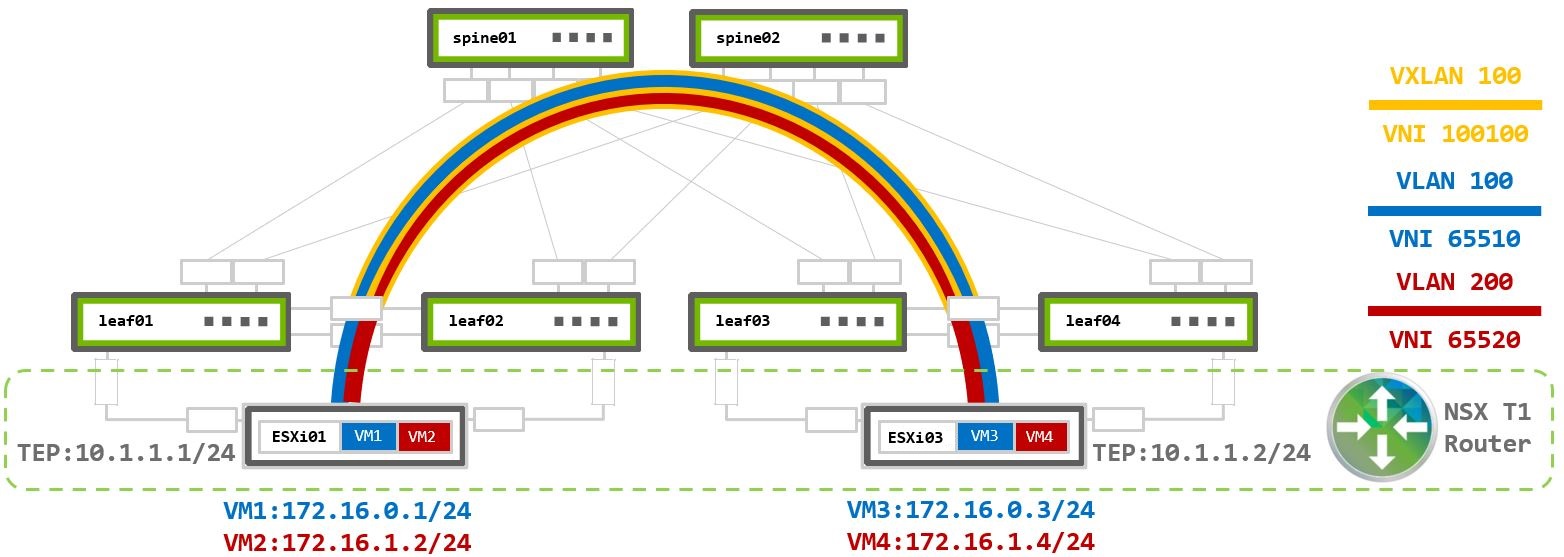
The NSX traffic will be unchanged from the scenarios described earlier. Reference the Layer 2 or Layer 3 examples for details. Traffic destined outside of the NSX fabric will follow the same traffic flow as described in the Virtualized and Bare Metal section.
With VXLAN in the network fabric, Geneve traffic from ESXi TEP is encapsulated again into VXLAN packets on the leaf switch using the local loopback IP addresses as the tunnel sources and the remote VXLAN anycast IP as the destination.
When the remote leaf receives the VXLAN packet, it is decapsulated and fowared to the ESXi host where the Geneve packet is decapsulated and forwared to the correct local VM.